 ChipBuddy
← Home
ChipBuddy
← Home
CTS Configuration & the Property System
Every clock engine you will ever drive has the same problem to solve: it must accept dozens of intent statements from the engineer and resolve them into a single, unambiguous set of instructions per clock net, per subtree, and per cell instance. The mechanism that modern tools use to do this is a property system — a layered store of named settings, each of which can be attached at a different level of granularity, with a deterministic precedence order to decide who wins when two settings disagree. If you understand how that store is organized and how it resolves conflicts, you can configure any clock engine quickly and, more importantly, debug why a clock got built the way it did. This chapter explains the model, the major categories of knobs, the scoping and override rules, and how to keep the whole thing reproducible.
Why a Property System Instead of a Flat Command Set
In the earliest CTS flows, configuration was a flat list of global commands: one target skew, one buffer list, one transition limit for the entire design. That worked when a chip had one clock. Modern SoCs have hundreds of clocks — functional clocks, test clocks, divided-down clocks, gated domains — each with different frequencies, different criticality, and different physical footprints. A single global setting cannot express "tighten skew on the high-speed datapath clock but relax it on the slow always-on clock."
The property system solves this by letting you state intent at the narrowest level that is true. You set a sensible default once, globally. Then you override only where reality differs — per clock, per subtree, or per object. The engine merges these layers at build time. The payoff is that your script reads like a statement of intent rather than a pile of exceptions, and the engine has one consistent place to look up any setting.
Categories of Configurable Knobs
Configuration knobs fall into a handful of families. You do not need to touch most of them on a given block, but you must know they exist, because the difference between a clean clock and a broken one is usually two or three of these.
| Category | Representative property | Effect | When to change it |
|---|---|---|---|
| Timing | target skew, max latency, max | Sets the quality goals the | Per-clock when frequency |
| targets | transition | engine optimizes toward | or criticality differs |
| Effort / | optimization effort, max passes | Trades runtime for QoR runtime | Late in the project, on critical blocks |
| Cell | buffer list, inverter list, gate cell | Restricts which library | Always — to control drive, |
| selection | list | cells the engine may insert | leakage, EM, and |
inversion strategy
| Physical / | max fanout, spacing rule, halo/ | Controls placement | When congestion or signal |
|---|---|---|---|
| density | keepout, layer constraint | legality and routability of | integrity bites |
the tree
| Power | clock gating insertion, low-power | Steers the engine toward | On power-sensitive or |
|---|---|---|---|
| cell preference, dynamic-power | power-aware structures | mobile parts |
weighting
| Useful | useful-skew enable, skew | Lets the engine | When borrowing slack |
|---|---|---|---|
| skew | window, latency offset per pin | deliberately skew launch/ | across paths is wanted |
capture to fix timing A few notes that interviewers like to probe. The cell-selection list is the single most consequential knob. If you allow only buffers, the tree cannot use inversion to balance loads or improve duty cycle; if you allow inverters, the engine can build inverter pairs and often gets tighter transition control, but you must then reason about polarity. Transition (slew) limits are deceptively important: a loose transition target produces fewer, larger cells (better latency, worse signal integrity and OCV behavior), while a tight one produces a deeper, more uniform tree (better robustness, more area and power). Useful- skew controls are powerful but double-edged — they intentionally break the "balance everything to zero skew" intuition, so they belong in a deliberate, documented decision, not a default.
How Properties Are Named and Set
The command surface, stripped of vendor branding, looks like a generic getter/setter pair operating on named objects. You name the object (a clock, a subtree root, a pin, or the special global scope), name the property, and supply a value.
# Set a global default for every clock in the design
set_property -scope global  cts.target_skew        50ps
set_property -scope global  cts.max_transition      120ps
set_property -scope global  cts.buffer_list         {BUFX2 BUFX4 BUFX8}
set_property -scope global  cts.inverter_list       {INVX4 INVX8}
# Inspect what the engine will actually use
get_property -scope global  cts.target_skew
# -> 50ps
The mental model: set_property writes into the layered store at the level named by -scope ;
get_property reads back the stored value at that level (not necessarily the effective value — moreon that distinction below). A subtle but important point is that property values carry units and types, and the engine validates them at set time, not just at build time. A skew target is a time; a cell list is a collection of library cell names; a fanout limit is an integer; an enable is a boolean. Passing a malformed value — a cell name that does not exist in the linked libraries, a negative latency, a transition in the wrong unit — should be rejected immediately rather than silently coerced. Good practice is to read back each value right after setting it during script development, because a typo in a cell name will not throw at set time in every tool but will quietly shrink the engine's available cell palette, producing a deeper or more power-hungry tree for reasons that are invisible later. The few extra get_property calls during bring-up pay for themselves the first time they catch a fat-fingered cell name. It also helps to think of properties as falling into two behavioral classes. Constraint properties (skew, latency, transition, fanout) express goals or limits the engine optimizes toward or must not violate. Resource properties (buffer list, inverter list, gate cell list, layer constraints) describe the materials the engine is allowed to use. The two classes interact: a tight constraint with a thin resource list can be unsatisfiable, and the engine will either violate the constraint or insert structures you did not anticipate. Whenever you tighten a constraint, ask whether the resource list is rich enough to satisfy it; whenever you trim a resource list, ask whether any constraint now becomes unreachable.
Scoping and Precedence
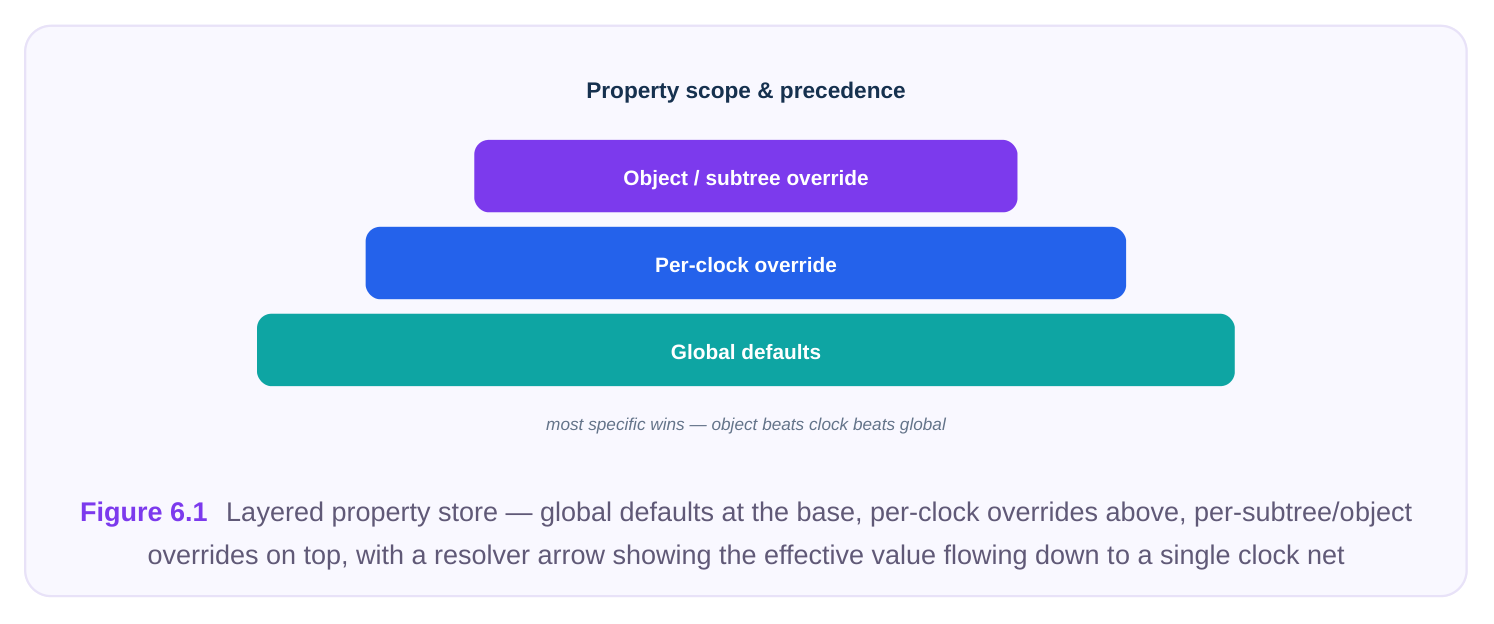
This is the heart of the chapter, and the most common interview topic. Properties resolve from most specific wins. The engine builds the effective configuration for each clock net by starting at the global default and then applying, in order, any per-clock setting, then any per-subtree setting, then any perobject (pin/instance) setting. The last one to apply is the value used.
| Scope level | Granularity | Typical use | Precedence |
|---|---|---|---|
| Global | Whole design | Baseline targets and cell lists default | Lowest — applied first |
| Per-clock | One clock domain | Frequency/criticality-specific targets | Overrides global |
| Per-subtree | A branch under a named | Localized cell or spacing rules | Overrides per-clock |
root
| Per-object | A single pin or instance | Pin-specific latency offset, do-not- | Highest — applied |
|---|---|---|---|
| touch | last |
A worked override looks like this. The global default sets a relaxed 50 ps skew, but the high-speed clock needs 25 ps and a richer cell list; one leaf pin that drives an analog macro must be excluded entirely.
# Global baseline already set above (50ps skew)
# Tighten just the high-speed clock
set_property -clock CLK_HS  cts.target_skew    25ps
set_property -clock CLK_HS  cts.buffer_list    {BUFX4 BUFX8 BUFX16}
set_property -clock CLK_HS  cts.max_fanout     16
# A subtree under a noisy region gets wider spacing
set_property -subtree CLK_HS/u_core/clk_root  cts.spacing_rule  2x
# One pin must not be touched by the engine
set_property -object [get_pins u_ana/clk_in]  cts.exclude  true
# Ask the engine for the EFFECTIVE value seen by a specific net,
# after all layers are merged:
get_property -effective -clock CLK_HS  cts.target_skew
# -> 25ps   (per-clock override beat the 50ps global default)
The distinction between the stored value at a scope and the effective value for an object is worth internalizing. get_property -scope global cts.target_skew tells you what the global layer holds.
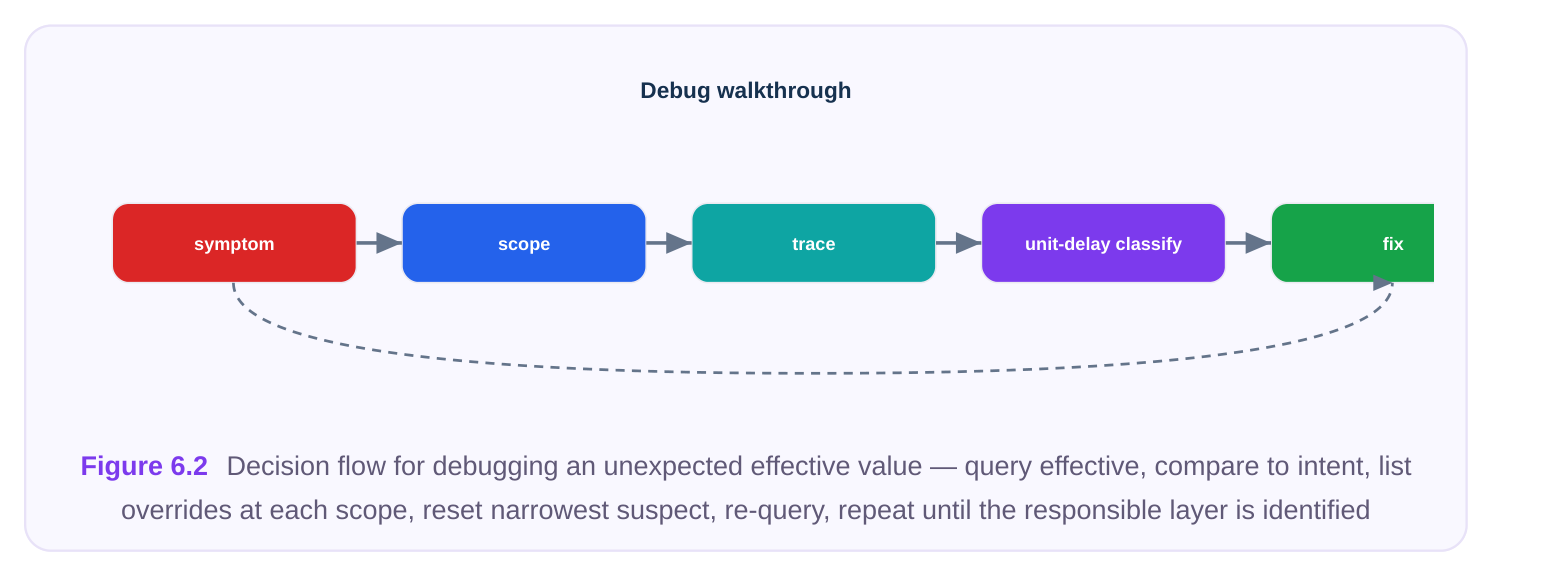
get_property -effective ... runs the resolver and tells you what a given clock or pin will actuallyexperience. When a clock builds "wrong," the first debugging move is almost always to query the effective value and discover that some narrower scope quietly overrode your intent.
Querying and Resetting
A configuration you cannot inspect is a configuration you cannot trust. Every property system gives you read-back and reset:
- Query a single value at a scope, or query the effective value for an object.
- List all properties currently set on a clock or subtree, which is the fastest way to spot an override you forgot about.
- Reset a property to remove your override and fall back to the next layer down — distinct from setting it to the tool default, which writes an explicit value at that scope.
# Dump everything currently attached to a clockreport_properties -clock CLK_HS# Remove an override so the global default takes over againreset_property -clock CLK_HS cts.target_skew# Confirm the fallbackget_property -effective -clock CLK_HS cts.target_skew# -> 50ps (override removed; global default now wins)Resetting and re-querying is also how you sanity-check a script you inherited: dump the properties, reset the suspicious ones, and watch the effective values move. If nothing moves, the value was coming from a different layer than you assumed.
Order of Operations Within a Scope
Precedence answers "which scope wins" — but there is a second, easily missed question: within a single scope, what happens when the same property is set twice? The answer in nearly all property systems is last-write-wins at a given scope. If your script sets cts.target_skew to 50 ps in one file and to 40 ps in a later-sourced file, both at global scope, the 40 ps value is what remains, because the second write overwrote the first slot in that layer. This is distinct from cross-scope precedence: there, both values coexist in different layers and the resolver picks the narrower one at build time; here, the two writes contend for the same slot and only one survives. This matters most in flows that source many configuration fragments. A common bug is a shared default file sourced after a block-specific override file, silently clobbering the override at the same scope. The defense is simple and worth stating in interviews: source order is part of your configuration, so global defaults must be sourced first and overrides last, and you should never re-source the global block after applying overrides. When in doubt, the effective-property snapshot taken at build start is the ground truth — it reflects every write in the order it actually happened, regardless of how the files were organized.
| Situation | Mechanism | Outcome |
|---|---|---|
| Two writes, same property, same | Last-write-wins (slot overwrite) scope | Final write survives; earlier write is gone |
| Two writes, same property, | Resolver precedence (most- | Both stored; narrower scope used |
| different scopes | specific-wins) | per object |
| Override then reset, same scope | Slot cleared | Falls through to next lower scope |
Holding these two rules side by side — slot overwrite within a scope, precedence across scopes — explains nearly every "but I set it to X" surprise you will encounter.
Sensible Defaults vs. Aggressive Settings
A recurring judgment call is how hard to push. Aggressive settings — very tight skew, maximum effort, large cell lists, aggressive useful-skew — can squeeze out the last picoseconds, but they cost runtime, can over-insert buffers (hurting power and area), and sometimes destabilize convergence so that small upstream changes cause large clock-tree churn. The professional habit is to start conservative, confirm a clean and reproducible build, then tighten deliberately on the clocks that actually need it.
| Setting | Conservative default | Aggressive | Trade-off you are buying |
|---|---|---|---|
| Target skew | Relaxed (per spec | Very tight margin) | Tighter skew costs buffers, power, runtime, and stability |
| Optimization | Medium | Maximum effort | Higher effort costs wall-clock time for marginal QoR |
| Cell list | Few, well- characterized cells | Many cells incl. large drives | More cells = more freedom but harder to reason about EM/leakage |
| Useful skew | Off or narrow window | Wide, latency- borrowing | Borrowed slack can fix timing but complicates ECO and OCV closure |
| Max fanout | Moderate | High | High fanout reduces depth but worsens |
transition and SI The guiding principle: only spend QoR-buying effort where the timing report says you need it. A 25 ps skew target on a clock that closes comfortably at 50 ps is pure waste — extra buffers, extra power, extra runtime, and a more fragile tree, for no benefit.
Keeping Configuration Reproducible
Because the property store is layered and the resolver is order-sensitive, configuration is easy to get working and hard to keep reproducible unless you are disciplined. Three practices separate a maintainable flow from a fragile one.
First, drive everything from version-controlled scripts, never from interactive typing. The global block goes in one file; per-clock overrides go in a clearly labeled section. Anyone reading the script should be able to reconstruct the effective configuration without running the tool. Second, document every override with a reason, inline. An override without a justification is a liability — the next engineer cannot tell whether 25 ps is a hard requirement or a leftover experiment.
# Global defaults — applies to all clocks unless overridden below
source ./cfg/cts_global.tcl
# --- Per-clock overrides (each MUST cite a reason) ---
# CLK_HS: 2.0 GHz datapath; 25ps skew required by setup closure on
#         the FP pipeline (see timing report 2026-06, path group FPU).
set_property -clock CLK_HS  cts.target_skew  25ps
# CLK_AON: always-on domain; relax skew to save power, 80ps is within
#          spec margin and reduces buffer count ~30% (power review).
set_property -clock CLK_AON cts.target_skew  80ps
Third, emit a configuration report as a build artifact. Dump the effective properties for every clock at the start of each run and archive it alongside the logs. When a result changes between two runs, diffing two property dumps is the fastest way to find which knob moved — far faster than re-reading the scripts and re-deriving the resolver outcome in your head.
# Snapshot effective config for the archive at build start
foreach clk [get_clocks *] {
report_properties -effective -clock $clk
}
Interview Q&A
clock. Which wins, and how would you confirm it? The per-clock setting wins. Properties resolve most-specific-first: global is the base layer, per-clock overrides it, per-subtree overrides that, and perobject is highest. To confirm without guessing, query the effective value for that clock ( get_property -effective -clock ... ), which runs the resolver and returns the value the engine will actually use — here, 25 ps. Reading the global scope alone would mislead you, because it only reports the stored base-layer value.
value? Resetting removes your override at that scope, so the value falls through to the next layer down (e.g., per-clock falls back to global). Setting it to the default value writes an explicit entry at that scope that happens to equal the default — which still blocks any lower-priority layer from showing through and prevents future global changes from propagating. Reset when you want layered fallback; set explicitly only when you truly want to pin a value regardless of other layers.
reason about the tree? Allow inverters when you want the engine to use inverter pairs for tighter transition control and load balancing, or when inversion helps duty-cycle correction. The cost is that you must now track polarity through the tree — an odd number of inversions flips the clock edge, which matters for generated clocks, latch transparency, and any logic that assumes a known phase. With buffers only, polarity is trivially preserved but you lose that optimization lever. It is a deliberate trade, not a default.
script looks right. How do you debug it via the property system? Start by dumping the effective configuration for that clock and compare it to intent. The usual culprits are a narrower-scope override you forgot (a per-subtree spacing or fanout rule), an unintentionally tight skew or transition target, or a cell list that excludes the large drive cells and forces deep buffering. Query effective values for skew, transition, max-fanout, and the cell list; reset suspected overrides one at a time and re-query to see which layer was supplying the value. Diffing this run's archived property snapshot against a prior good run usually pinpoints the moved knob in seconds.
Key Takeaways
- A clock engine is configured through a layered property store: named settings attached at global, per-clock, per-subtree, or per-object scope.
- Resolution is most-specific-wins — global is the base, per-object is highest. Always check the effective value, not just the stored value at one scope.
- The major knob families are timing targets, effort, cell selection, physical/density, power, and useful skew; cell-list and transition choices have outsized impact.
- Reset drops to the next layer; setting an explicit value pins it and blocks lower layers — these are not the same operation.
- Push aggressive settings only where timing demands it; tight targets cost buffers, power, runtime, and stability.
- Keep configuration reproducible: script everything, justify every override inline, and archive an effective-property snapshot per build so result changes can be traced to the exact knob that moved.
Comments
Leave a Reply