 ChipBuddy
← Home
ChipBuddy
← Home
Troubleshooting & Common Issues
When a clock tree refuses to build cleanly, the difference between a junior and a senior engineer is rarely raw tool knowledge. It is the speed and discipline with which they can read the error log, form a hypothesis about the root cause, and apply a targeted fix instead of randomly toggling switches. CTS sits at a fragile junction between logic intent (the SDC constraints), physical reality (placement, congestion, blockages), and the optimization engine itself. A failure in any of those three layers shows up as a CTS problem, and your job is to localize which layer is actually broken. This topic walks through eight of the most common failure modes you will hit in production CTS runs, and the ones interviewers love to probe because they reveal whether you genuinely understand the flow. For each case we follow the same diagnostic loop: what you observe (Symptom), what could be behind it (Likely Causes), how to confirm it (How to Detect), what to do about it (Resolution Steps), and how to stop it recurring (Prevention). Treat this as a runbook you can mentally page through when a real run goes sideways.
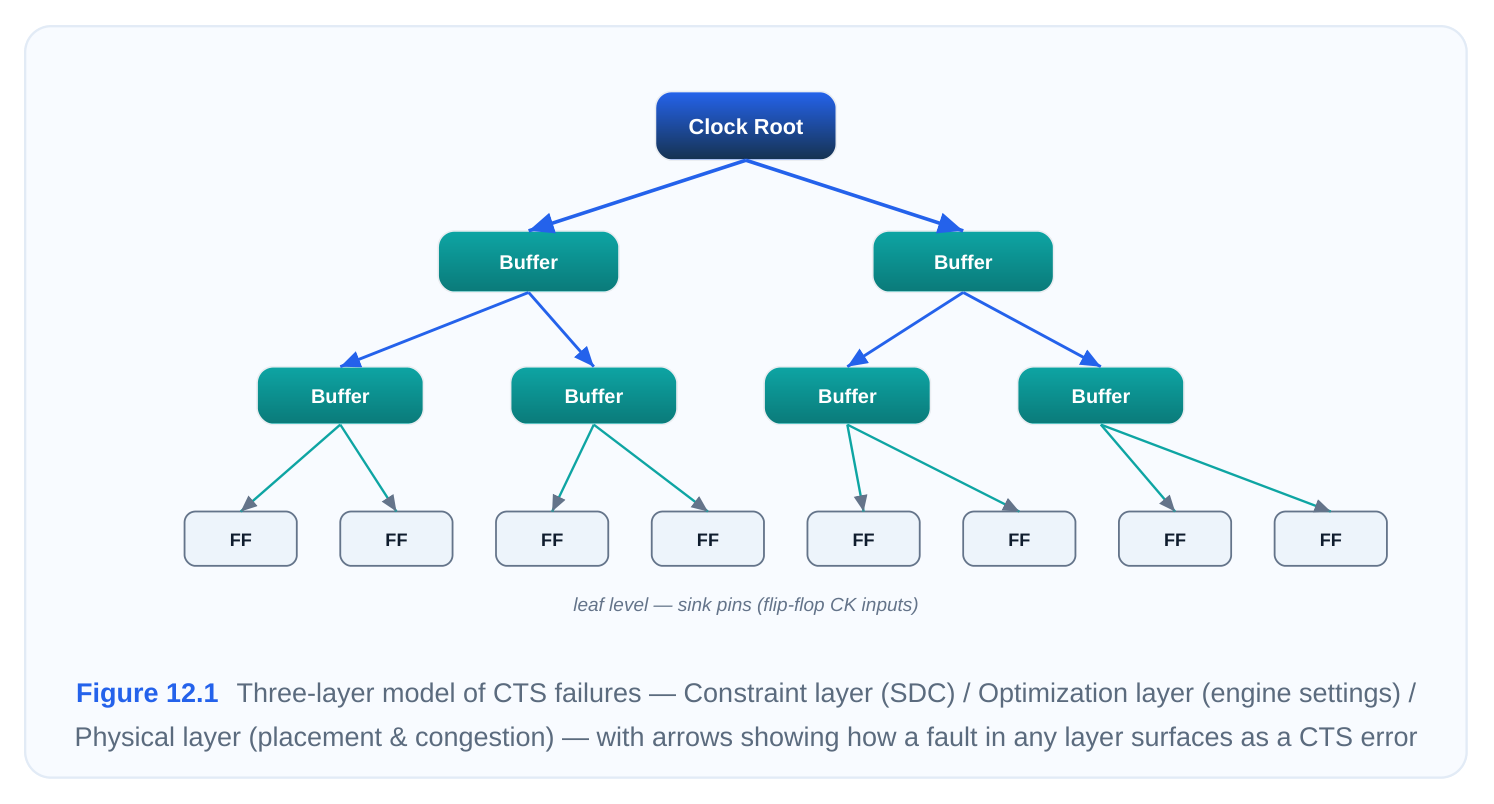
Before diving in, internalize one habit: always run the clock-tree sanity checks before you launch syn‐ thesis, not after the tool has spent an hour and failed. A two-minute check_clock_trees up front saves you the long, expensive runs that end in a cryptic error.
12.1 "Clock has no sinks"
Symptom
The tool reports that a defined clock reaches zero endpoints, with a message along the lines of "Clock CLK has no sinks" or "No sequential elements found for clock domain." CTS either skips that clock en‐ tirely or aborts. Downstream, you notice the clock net was never buffered and timing reports show the domain as empty.
Likely Causes
A clock with no sinks almost always means the clock signal is defined at a point in the netlist from which it never electrically reaches a flop, latch, or macro clock pin. The usual suspects:
- The
create_clockwas placed on a port or pin that is disconnected from any register clock pin, often because of a typo in the object name or an outdated net name after a netlist revision. - A clock gating cell (ICG) in the path has its enable tied off in a way that, for analysis purposes, the path looks dead, or the gate is being treated as a logic boundary.
- The clock fans only into combinational logic or into a block whose registers are clocked by a differ‐ ent (generated or divided) clock, so the parent clock genuinely has no direct sinks.
- The endpoints exist in a sub-block that was not elaborated, was black-boxed, or whose hierarchy was flattened/renamed so the connectivity broke.
How to Detect
Start with the dedicated checker, then trace connectivity manually.
# Sanity-check every clock tree before synthesis
check_clock_trees -clocks [get_clocks CLK]
# Confirm the clock object actually exists and see its source
report_clock -nosplit [get_clocks CLK]
# Trace what the clock net is electrically connected to
all_connected [get_nets -of_objects [get_clocks CLK]]
# List sinks the tool currently associates with the clock
get_pins -of_objects [get_clocks CLK] -filter "is_clock_pin == true"
If check_clock_trees returns an empty sink list while you expect flops, the disconnect is real. Crosscheck the source object with get_ports / get_pins to make sure the name you constrained still ex‐ ists.
Resolution Steps
- 1. Verify the clock definition points at a live driver. If the port/pin name is stale, redefine the clock on
the correct object.
- 2. Trace the net with
all_fanoutto see where it dies. If it stops at a gating cell, confirm the ICG is
not being mis-modeled and that its output drives downstream flops.
- 3. If the clock legitimately drives sinks only through a generated clock, make sure that generated
clock is defined and that it is the one CTS should be balancing — the parent may correctly have no direct sinks.
- 4. When the tool simply cannot infer the intended balance endpoints (for example a feed-through or a
clock crossing a hard boundary), explicitly declare them so CTS has something to target:
# Tell CTS which pins to treat as balance endpoints for this clock
set_clock_balance_points -clocks [get_clocks CLK] \
-balance_points [get_pins {macro_inst/CLKIN core_ff/CK}]- 1. Re-run
check_clock_treesand confirm the sink count is now non-zero before launching CTS.
Prevention
Lock down a "clock report" gate in your flow: after reading SDC, dump every clock's source and sink count and fail the run if any clock shows zero sinks. Keep clock definitions parameterized off the actual hierarchy so a netlist refresh does not silently orphan a constraint.
12.2 "Invalid generated clock master"
Symptom
create_generated_clock throws an error such as "Master clock source not found" or "Invalid masterclock for generated clock GCLK." The generated clock is never created, and any timing or CTS that depends on it fails or treats the divided/multiplied net as unconstrained.
Likely Causes
A generated clock is defined relative to a master clock that already exists at some source pin. The error means the tool cannot resolve that master:
- The
-master_clock(or the-sourcepin it points to) was never defined, or was defined later in the constraint order — SDC is read top-to-bottom, so a generated clock referencing a master that appears below it will fail. - The
-sourcepin name is wrong, has changed after a hierarchy edit, or sits on the wrong side of a buffer/clock cell. - The master clock exists but on a different object than the one you referenced (for example you pointed at the PLL reference input when the divider actually taps the PLL output).
- Multiple clocks reach the source pin and the tool cannot disambiguate which is the master, so it rejects the definition.
How to Detect
# Does the master clock actually exist yet?
report_clock [get_clocks REF_CLK]
# Inspect the source pin of the generated clock and what clocks reach it
report_clock_timing -type clock -to [get_pins pll/CLKOUT]
get_clocks -of_objects [get_pins pll/CLKOUT]
# Re-list all generated clocks and their masters
report_clock -nosplit [all_clocks]
If report_clock REF_CLK returns nothing, the master is missing or misnamed. If multiple clocks come back from get_clocks -of_objects , you have an ambiguity to resolve.
Resolution Steps
- 1. Confirm the master clock is defined and reordered above the generated clock in your SDC. Con‐
straint ordering is the single most common root cause here.
- 2. Fix the
-sourcepin so it points at the exact pin where the master is present. After a hierarchy
change, re-derive the pin path.
- 3. When several clocks reach the source pin, disambiguate by naming the intended one explicitly with
-master_clock .
- 4. Redefine the generated clock cleanly. A typical divide-by-2 off a PLL output:
# Master must already exist on pll/REFCLK
create_clock -name REF_CLK -period 9.6 [get_pins pll/REFCLK]
# Generated divide-by-2 on the PLL output, master disambiguated
create_generated_clock -name GCLK_DIV2 \
-source [get_pins pll/REFCLK] \
-master_clock [get_clocks REF_CLK] \
-divide_by 2 \
[get_pins div_reg/Q]- 1. Re-run constraint analysis and confirm the generated clock now appears in
report_clockwith the
correct period and source.
Prevention
Keep all primary create_clock statements in one block at the top of the SDC and all cre‐ ate_generated_clock statements below them. Add a post-read check that every generated clock re‐ solves its master, and treat any unresolved master as a hard error rather than a warning.
12.3 "Loop in clock network"
Symptom
CTS or timing analysis reports a combinational loop or loop in clock network and either breaks the loop arbitrarily (giving unpredictable results) or refuses to proceed. You may also see warnings about a clock that cannot be levelized.
Likely Causes
The clock distribution must be a tree (or at most a controlled mesh) — a directed acyclic structure from root to sinks. A loop means a clock signal feeds back into its own path:
- A genuine combinational feedback path in the clock network, often an accidental connection through a mux or glue logic where a clock output loops back to an upstream select or data pin that is on the clock path.
- A PLL or DLL feedback path that was not declared as a feedback (so the tool sees a real cycle instead of a modeled loop) — these need a
set_disable_timingor a properly modeled feedback divider. - Unintended clock paths created when a functional signal is mistakenly inferred as a clock, pulling a data feedback loop into the clock graph.
- Clock gating or muxing structures wired such that the gate's output can re-drive its own enable through the clock domain.
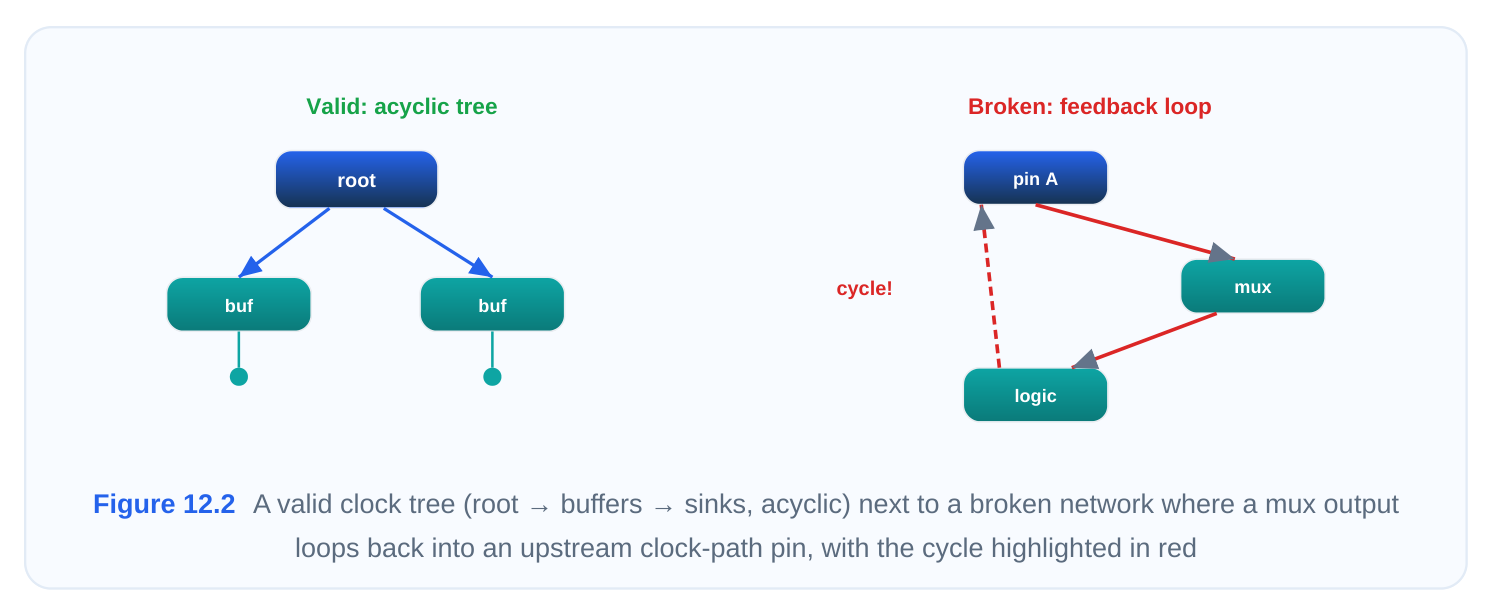
How to Detect
# Surface loops the tool has detected/broken
report_timing -loops
# Walk the clock fanout to spot a path that returns to its origin
all_fanout -from [get_pins clk_mux/Z] -flat -clock_tree
# Check what is being disabled to break the loop automatically
report_disable_timing -clock
report_timing -loops  lists the cells the tool chose to break the loop at — that list is your map to the
offending logic. If the broken arc sits inside a PLL feedback, the loop is a modeling issue, not a netlist bug.
Resolution Steps
- 1. Classify the loop: is it a real, unintended netlist feedback, or an expected PLL/DLL feedback that
simply was not modeled?
- 2. For an unintended feedback, fix it in RTL/netlist — remove the stray connection, correct the mux
wiring, or break the path that lets a clock re-enter its own cone. This is a design bug, and CTS should not paper over it.
- 3. For a legitimate PLL feedback, model it correctly so the tool stops treating it as a cycle:
# Break the PLL feedback arc so it is not seen as a combinational loop
set_disable_timing [get_pins pll/FBIN]
# Or model the feedback explicitly as a generated clock if required
create_generated_clock -name FB_CLK -source [get_pins pll/CLKOUT] \
-divide_by 1 [get_pins pll/FBIN]- 1. If a functional signal was mis-inferred as a clock, remove the erroneous
create_clockso the data
feedback no longer joins the clock graph.
- 2. Re-run
report_timing -loopsand confirm the clock network is now loop-free.
Prevention
Never let the tool silently auto-break clock loops in a signoff run — make loop reports a review item. Audit any mux or glue logic that sits on a clock net during synthesis, and ensure all PLL/DLL feedback arcs are explicitly disabled or modeled in the constraint deck from day one.
12.4 "High skew (>0.45 ns)"
Symptom
Post-CTS skew reports show global or local skew well above the target — say 0.45 ns or more against a 0.1–0.18 ns budget. Setup and hold both suffer, and the timing-driven CTS report shows large arrival-time spread across sinks of the same clock.
Likely Causes
Skew is the spread of clock arrival times across sinks. Excessive skew typically comes from:
- Loose or missing constraints — no tight
max_transition/max_capacitanceon the clock, so buf‐ fer insertion is lazy and arrival times drift apart. - Poor tree topology: an imbalanced fanout structure, long routes to a cluster of far-flung sinks, or a single overloaded buffer driving wildly different load groups.
- Endpoint imbalance — sinks with very different downstream loads or wire lengths that the engine did not equalize.
- Target skew set too loose, or local skew optimization disabled so the engine optimizes only global skew and ignores critical sink-pair skew.
How to Detect
# Global skew summary per clock
report_clock_tree -summary
# Detailed arrival times to find the early/late outliers
report_clock_timing -type skew -clock [get_clocks CLK]
# Check transitions — slow edges inflate skew
report_constraint -all_violators -max_transition
Look at the longest and shortest insertion delays in the skew report. If a handful of sinks dominate the spread, you have an endpoint-imbalance problem; if everything is uniformly slow with bad transitions, it is a constraint/effort problem.
Resolution Steps
- 1. Tighten the clock transition and capacitance limits so the engine inserts buffers more aggressively
and edges stay sharp.
set_max_transition 0.135 [get_clocks CLK] -clock_path
set_clock_tree_options -target_skew 0.045 -clocks [get_clocks CLK]- 1. Enable high-effort timing mode and turn on local (sink-pair) skew optimization rather than relying on
global skew alone.
set_clock_tree_options -high_effort_timing_mode true \
-local_skew_opt true -clocks [get_clocks CLK]- 1. Reduce the target skew toward your budget, but stay realistic — chasing zero skew explodes
power and runtime.
- 2. If specific outlier sinks drive the spread, address them with local skew optimization on those
endpoints or by improving their placement/clustering so loads are balanced.
- 3. Re-synthesize the clock and re-check
report_clock_timing -type skew.
Prevention
Set tight, sensible clock transition limits in your default CTS recipe. Cluster sinks by load and proximity during placement so the engine starts from a balanceable structure, and monitor skew as a tracked metric across runs so regressions are caught early.
12.5 "Long runtime (>30 minutes)"
Symptom
A single clock-tree synthesis pass runs far longer than expected — 30 minutes, an hour, or more for a block that should finish in minutes. The log shows the engine churning on legalization, optimization iterations, or buffer placement.
Likely Causes
Runtime blow-up almost always traces to the engine being asked to solve an over-constrained or physically hostile problem:
- Constraints set too tight (near-zero target skew, very tight transition) force the engine into exhaustive optimization with diminishing returns.
- Legalization conflicts — buffers cannot find legal sites near where they are needed, so the legalizer spends enormous effort shuffling cells.
- Congestion in the placement: high utilization or routing congestion forces repeated re-placement and rip-up of clock cells.
- High-effort modes left on globally when they are only needed for a few critical clocks, multiplying work across the whole design.
How to Detect
# Where is time being spent? Check the runtime/effort breakdown
report_clock_tree -runtime_summary
# Check placement density / congestion in clock-cell regions
report_congestion -region clock
# Inspect current effort settings that may be over-aggressive
report_clock_tree_options
If the runtime summary shows legalization or optimization dominating, target that phase. If congestion is high in the relevant region, the bottleneck is physical, not algorithmic.
Resolution Steps
- 1. Loosen over-aggressive constraints first — relax target skew and transition limits to sane values
and re-measure runtime.
set_clock_tree_options -target_skew 0.09 -clocks [all_clocks]
set_clock_tree_options -high_effort_timing_mode false -clocks [all_clocks]- 1. Switch to advanced/incremental legalization so buffers settle into legal sites faster instead of brute-
force shuffling.
set_clock_tree_options -legalization_mode advanced- 1. Disable high-effort modes globally and re-enable them only on the specific critical clocks that need
them.
- 2. If congestion is the culprit, fix placement — reduce local utilization, add placement blockages to
steer clock cells into open regions, or improve the floorplan before re-running CTS.
- 3. Re-run and confirm the runtime is back in range.
Prevention
Profile a baseline CTS runtime per block and alert when a run exceeds it. Keep high-effort settings scoped to the clocks that actually need them, and resolve placement congestion before CTS rather than asking the clock engine to route around it.
12.6 "Power too high"
Symptom
Post-CTS power reports show clock-network power consuming an outsized share of total dynamic power, or the design exceeds its power budget. You see many large buffers, a deep buffer chain, or high switching capacitance on clock nets.
Likely Causes
The clock network is one of the highest-activity nets in any chip — it toggles every cycle — so an inefficient tree is a power sink:
- Too many large/high-drive buffers inserted, often a side effect of over-tight skew/transition con‐ straints.
- A deep tree (many buffer levels) increasing total clock capacitance and short-circuit power.
- Large sink loads or long routes inflating the capacitance the clock must drive.
- Power optimization (dynamic and leakage) not enabled, so the engine optimizes only for timing/ skew and ignores cell sizing for power.
How to Detect
# Break out clock-network power vs total
report_power -clock_network
# Count buffers and tree depth
report_clock_tree -structure_summary
# Identify the largest / highest-activity clock buffers
report_power -cell_type buffer -clock CLK -sort_by dynamic
A high buffer count combined with deep levels and large cells points squarely at an over-built tree. Compare against a sibling block or a prior run to judge how far out of line you are.
Resolution Steps
- 1. Enable power-aware CTS so the engine balances skew against power, and turn on both dynamic
and leakage optimization.
set_clock_tree_options -power_opt true \
-dynamic_power_opt true -leakage_power_opt true \
-clocks [all_clocks]- 1. Loosen constraints that are forcing oversized buffers — a slightly looser skew or transition target
often removes a whole class of large cells with negligible timing cost.
- 2. Let the engine downsize buffers and prune unnecessary tree levels where the timing margin allows.
- 3. Where useful skew is acceptable, allow the tool to trade a little skew for fewer/smaller buffers.
- 4. Re-run
report_power -clock_networkand confirm the clock-power share has dropped.
Prevention
Enable power optimization in the default recipe rather than bolting it on after a budget miss. Track clock-network power as a first-class metric, avoid reflexively tightening skew when it is not required, and watch tree depth as an early warning of an over-built network.
12.7 "DRC violations (spacing, overlap)"
Symptom
After CTS, the design rule checker flags clock cells or routes — minimum-spacing violations, cell overlaps, or off-track/short geometries — concentrated around inserted clock buffers and the clock routing.
Likely Causes
CTS inserts and places new cells late in the flow, so it inherits whatever physical room is left:
- Congestion conflicts: the area where buffers are needed is already dense, so the legalizer cannot place them on legal, spaced sites.
- A tight placement window that boxes clock cells into too small a region, forcing overlaps.
- Pre-existing poor placement or blockages leaving no legal sites near the required buffer locations.
- Buffer cells chosen are physically large for the available pitch, or non-default-rule clock routing collides with adjacent geometry.
How to Detect
# Enumerate post-CTS DRC issues and their locations
check_legality -verbose
# Spacing/overlap violators specifically among clock cells
report_constraint -all_violators -drc
# Congestion in the regions where violations cluster
report_congestion -region clock
If violations cluster where congestion is high, the fix is physical. If they appear in a constrained band, the placement window is too tight.
Resolution Steps
- 1. Switch to advanced legalization so buffers are placed on legal, properly spaced sites with less
manual shuffling.
set_clock_tree_options -legalization_mode advanced- 1. Widen the placement window / relax the region in which clock cells may be placed so the legalizer
has room.
set_clock_tree_options -buffer_placement_window 1.5 -clocks [all_clocks]- 1. Improve the underlying placement — reduce local utilization, remove or resize over-aggressive
blockages, and free up sites near where buffers must go.
- 2. If a chosen buffer/inverter footprint simply does not fit the available pitch, substitute a more suitable
cell from the clock buffer set.
- 3. Re-run
check_legalityand confirm the violations are cleared.
Prevention
Reserve placement room for clock cells in congested regions during floorplanning, and keep utilization below the threshold where late-inserted buffers cannot legalize. Validate the clock buffer library against the site/track pitch before the project starts so cell-fit DRCs never appear.
12.8 Setup / Hold Time Violations
Symptom
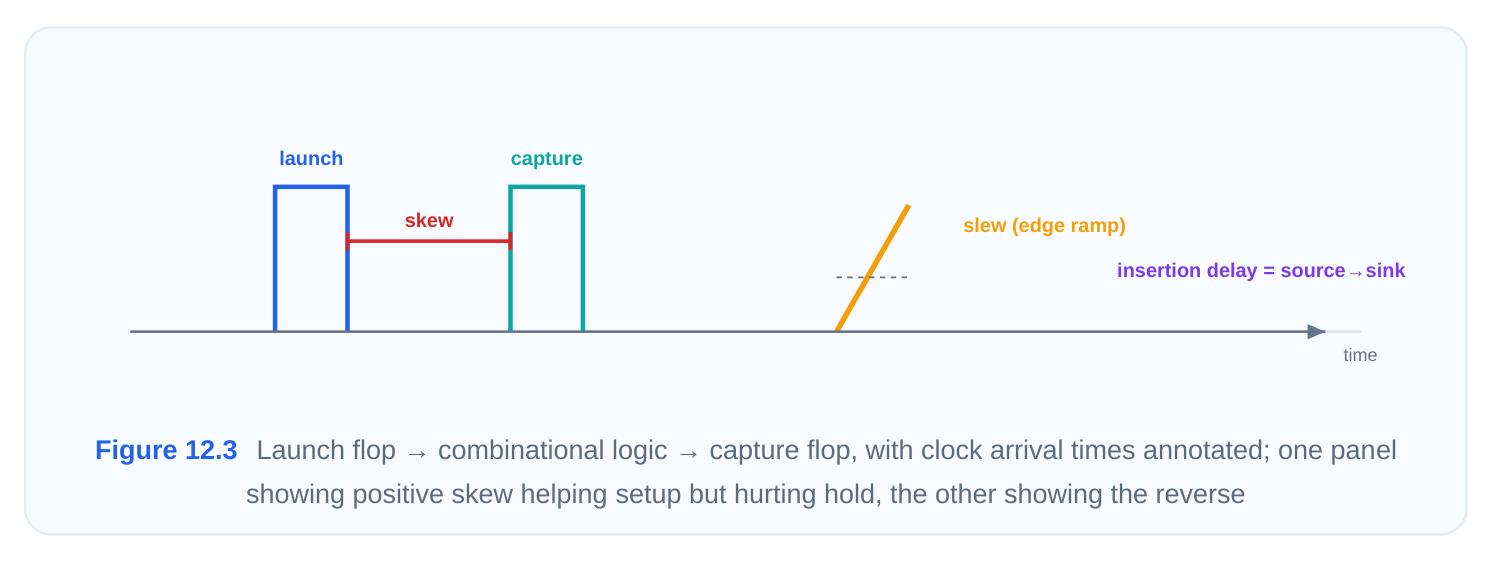
Post-CTS timing shows setup violations (negative slack on launch-to-capture paths, often worsened by skew), hold violations (data arriving too early relative to the clock edge, frequently introduced or revealed by CTS skew), or both. Hold violations in particular tend to appear after CTS because real clock latency and skew are now known.
Likely Causes
CTS replaces ideal clocks with real, skewed, delayed clocks, which directly perturbs both checks:
- Skew between launch and capture flops eating into the setup window or opening a hold window.
- Loose constraints letting the tree build with skew that timing cannot absorb.
- Insertion delay differences across domains creating large clock-to-clock skew on crossing paths.
- Timing optimization not run after the tree is built, so the engine never compensated for the now-real clock with buffer/sizing fixes or hold buffers.
How to Detect
# Setup picture with real clock latency
report_clock_timing -type setup -clock [get_clocks CLK]
# Hold picture — critical right after CTS
report_clock_timing -type hold -clock [get_clocks CLK]
# Worst paths overall, including clock-path detail
report_timing -delay_type min_max -path_type full_clock
Compare the clock arrival at launch versus capture in the worst paths. If capture is much later than launch on a setup-failing path, skew is the driver; if capture is much earlier on a hold-failing path, the same skew is hurting hold.
Resolution Steps
- 1. Diagnose first with
report_clock_timingfor both setup and hold so you know which check, which
paths, and whether skew or pure delay is to blame.
- 2. Loosen constraints that are forcing harmful skew, where the timing budget allows, and rebalance
the tree.
- 3. Enable timing optimization within CTS so the engine sizes cells and adjusts the tree to recover
slack.
set_clock_tree_options -timing_opt true \
-fix_hold true -clocks [all_clocks]- 1. Run a post-CTS timing optimization pass — the standard
clock_optstep — to let the tool insert
hold buffers and resize logic against the real clock.
# Post-CTS optimization: fix remaining setup and hold with real clocks
clock_opt -fix_timing -fix_hold_all_clocks- 1. Re-report setup and hold and iterate on any residual violators; if a few paths remain, target them
individually rather than re-tightening globally.
Prevention
Always reserve a clock_opt (post-CTS timing-fix) stage in the flow — never sign off on ideal-clock timing. Keep skew tight enough that hold is recoverable with reasonable buffer insertion, and check hold explicitly immediately after CTS, since that is the moment it first becomes real.
Quick-Reference: Symptom → Likely Cause → Fix
| Symptom | Most Likely Cause | First Thing to Try |
|---|---|---|
| Clock has no | Clock defined on a discon‐ | Verify connectivity with check_clock_trees ; de‐ |
| sinks | nected/stale object | clare set_clock_balance_points |
| Invalid generated | Master undefined or defined | Reorder SDC; fix -source ; redefine cre‐ |
| clock master | after the generated clock | ate_generated_clock |
| Loop in clock net‐ | Unintended feedback or un‐ | report_timing -loops ; fix netlist or set_dis‐ |
| work | modeled PLL feedback | able_timing the feedback arc |
| High skew (>0.45 | Loose constraints / endpoint | Tighten max_transition , enable high-effort + local |
| ns) | imbalance | skew opt |
| Long runtime (>30 | Tight constraints / legaliza‐ | Loosen constraints; advanced legalization; fix place‐ |
| min) | tion / congestion | ment |
| Power too high | Many large buffers / deep tree | Enable dynamic + leakage power opt; loosen skew |
| DRC (spacing/ | Congestion / tight placement | Advanced legalization; widen window; improve place‐ |
| overlap) | window | ment |
| Setup/Hold viola‐ | Skew from real clock; no | report_clock_timing ; run clock_opt - |
| tions | post-CTS opt | fix_hold_all_clocks |
Constraint-vs-Physical: Where Does the Fix Live?
A useful mental sort when triaging: most CTS issues are dominated by either the constraint/optimiza‐ tion layer (you fix it by editing SDC or engine options) or the physical layer (you fix it in placement/ floorplan). Knowing which saves wasted effort.
| Issue | Constraint/Engine Fix | Physical Fix |
|---|---|---|
| No sinks | Redefine clock, add balance points | Restore broken hierarchy/connectivity |
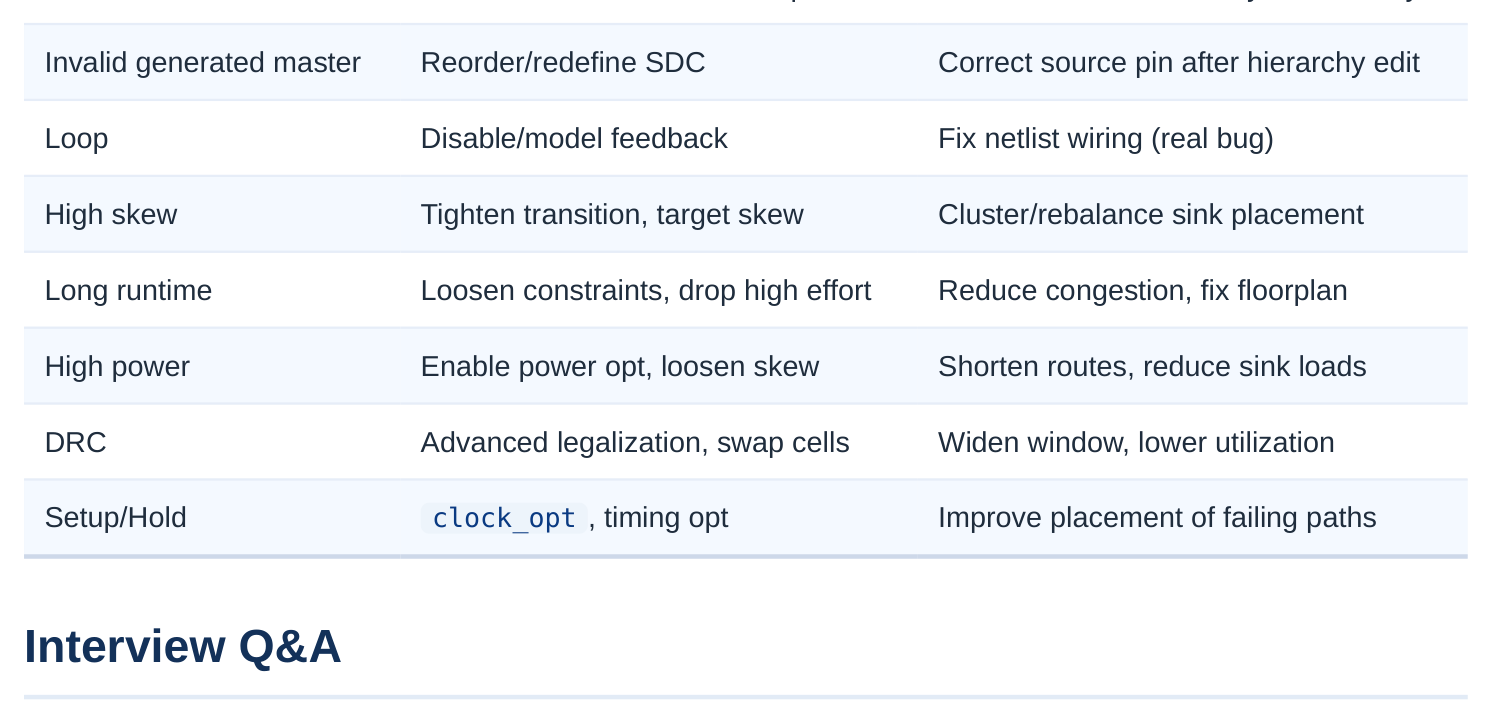
is ideal — zero insertion delay and zero skew — so hold checks see a clean, balanced clock and rarely fail. CTS replaces that ideal with a real tree that has genuine insertion delay and skew between launch and capture flops. When the capture clock arrives earlier than the launch clock on a short data path, the data can race past the capture edge, creating a hold violation that simply did not exist in the ideal model. That is why you must always check hold immediately after CTS and reserve a clock_opt pass to insert hold buffers.
confirm the clock object resolves to a live driver with report_clock and check the name against the current netlist — stale names after a hierarchy edit are the top cause. Then trace the net with all_connected / all_fanout to see where the path dies; commonly it stops at a gating cell or a boundary. If the clock legitimately reaches sinks only through a generated clock, the parent having no direct sinks is correct. If the tool genuinely cannot infer the endpoints, declare them with set_c‐ lock_balance_points .
between launch and capture flops. Positive skew (capture arrives later than launch) gives the data more time to settle, which helps setup but hurts hold because the late capture edge can sample data that has already changed. Negative skew does the reverse. This is why you cannot simply minimize skew blindly — useful skew can be exploited to fix setup, but you must guarantee hold remains recoverable with buffer insertion.
look first? Pull the runtime breakdown and see which phase dominates. If legalization or optimization is eating the time, the usual culprits are over-tight constraints (near-zero target skew, very tight transition) or high-effort modes left on globally — loosen those and scope high effort to only the critical
clocks. If congestion in the clock-cell regions is high, the problem is physical: the legalizer is fighting for sites, so fix placement utilization or the floorplan before re-running. Switching to advanced legalization also helps the engine settle buffers faster.
no sinks" error, and how do their fixes differ? The invalid-master error is a definition problem — the generated clock references a master clock the tool cannot resolve, usually because the master is undefined, defined later in the SDC, or pointed at the wrong source pin. The fix is in the constraints: reorder so masters come first, correct the source, and redefine the generated clock. "No sinks" is a connectivity problem — the clock is validly defined but never electrically reaches a register. The fix is to repair connectivity, point the clock at the right driver, or explicitly declare balance points. One lives in SDC syntax/order, the other in the netlist topology.
Key Takeaways
- Triage every CTS failure by layer first — constraint/SDC, optimization-engine settings, or physical placement/congestion — because the fix lives in a different place for each, and guessing wrong wastes whole runs.
- Run
check_clock_treesand dump per-clock sink counts before synthesis; catching orphaned clocks, missing masters, and loops up front is far cheaper than debugging a failed hour-long run. - Skew is a double-edged sword: it helps one timing check while hurting the other, so balance it against your real budget rather than chasing zero, and always treat hold as a post-CTS, real-clock concern.
- Over-tightening constraints is the hidden cause behind several issues at once — it inflates runtime, drives oversized power-hungry buffers, and creates DRC-causing congestion, so loosen to sane values before assuming a deeper problem.
- Never sign off on ideal-clock timing: reserve a post-CTS
clock_optstage with hold fixing enabled so the engine compensates for the real, skewed, delayed clock. - Loops and orphaned clocks are often genuine design or constraint bugs, not things to paper over — fix the root cause in the netlist or SDC instead of letting the tool auto-break or skip them.
Comments
Leave a Reply