 ChipBuddy
← Home
ChipBuddy
← Home
Routing Signal Nets
Routing Signal Nets
Once clocks are routed and shielded, the design hands its remaining millions of connections over to the signal router. This is the part of the flow people picture when they hear the word "routing": the tool takes every ordinary data, control, and bus net in the netlist and turns each one into actual metal that obeys the design rules of the technology. In the routing tool the engine doing this work is the router, and the single command that drives it end to end is auto_route . Everything else in this chapter is about understanding what that command does under the hood, how to run its pieces in isolation when you need control, and how to tell whether the result is something you can sign off on. The reason signal routing deserves its own chapter is volume and consequence. A clock tree might be a few thousand nets handled with surgical care. Signal routing is the other 99 percent of the connections, and the way they are laid down determines your wire delay, your coupling-induced noise, your antenna behavior, and ultimately whether the block closes timing. A router that gets a DRC-clean result but leaves long detours on critical paths has not actually done its job. Modern signal routing is therefore not just "connect the dots" — it is a timing-aware, crosstalk-aware optimization that happens to also produce legal geometry.
Routing Flow
| Global | Track | Detail | Postroute |
|---|---|---|---|
| Route | Assignment | Route | Opt |
Figure 12.1 Signal routing pipeline — input (placed, CTS-done netlist) flowing through global route, track
assignment, detail route, and DRC repair to a routed database
The Big Hammer: auto_route
auto_route is the umbrella command that runs the complete signal routing pipeline from a placed, CTS-completed database to a detail-routed, DRC-repaired result. Internally it sequences the three classic stages — global routing, track assignment, and detail routing — and then loops through iterations of DRC repair until the design converges or it hits the effort limit you set. For most blocks, a single invocation with a handful of options is the entire signal routing step.
# Full automatic signal routing, end to end
auto_route \
-max_detail_route_iterations 40 \
-timing_driven true \
-crosstalk_driven true
# Inspect what the router produced
report_design_violations
report_congestion -nets
A few things are worth calling out. By default auto_route routes every signal net that is not already routed and not marked to be skipped, so power, ground, and any pre-routed clock nets are left alone. The -timing_driven and -crosstalk_driven switches turn on the optimization behaviors discussed later; on a real production block you almost always want both. The - max_detail_route_iterations value caps how many DRC-repair passes the detail router will attempt — more on convergence effort below. It is also possible to scope auto_route so it only completes what is left rather than ripping up the world. If global routing was already done in an earlier session, the command is smart enough to reuse it. That incrementality is what makes the routing step restartable: you can route, look at results, change a setting, and re-run without throwing away good work. One mental model that helps newcomers: think of auto_route as a manager that delegates to three specialists and then runs quality control. The manager is convenient because you do not have to remember the order of the specialists or how to hand work between them, but the manager is only as good as the specialists it calls. When something goes wrong, you do not fire the manager — you go talk to the specialist whose stage produced the problem. That is precisely why every serious routing engineer learns to run the stages by hand even though they spend most of their time calling
auto_route . The umbrella command is for production; the individual stages are for understanding and for rescue work when production goes sideways.
Running the Stages Individually
auto_route is convenient, but the underlying stages exist as separate commands, and knowing how to drive them by hand is essential for debugging and for advanced flows. There are three of them, and they map cleanly onto how routers have worked for decades. Global routing ( global_route ) does not place any real wires. It carves the die into a coarse grid of global routing cells (gcells) and decides, for each net, which sequence of gcells the net will pass through. The output is a routing plan plus a congestion map — the famous picture of red and yellow squares that tells you where too many wires want to go through too little space. Global routing is fast and is the right place to evaluate routability before you commit to anything expensive. Track assignment ( assign_tracks ) takes the global routing plan and assigns each net segment to a specific routing track on a specific layer, converting the gcell-level plan into long, mostly-straight wires sitting on legal tracks. This stage is where the bulk of the metal length is decided. It produces wires that are well-formed but may still have violations at the points where they need to connect to each other and to pins. Detail routing ( detail_route ) is the stage that makes everything legal. It connects the trackassigned segments together, drops vias, jogs around obstacles, fixes spacing and width violations, and resolves the messy local geometry that the earlier stages left approximate. Detail routing is iterative by nature: it routes, finds violations, and reroutes the offending regions repeatedly.
# Drive the three stages by hand
global_route -congestion_effort medium
report_congestion
assign_tracks
detail_route -max_number_iterations 40
report_design_violations
Why run them separately? Mostly diagnosis. If your block is uncloseable, global routing alone tells you in minutes whether the problem is fundamental congestion — in which case the fix is floorplan or placement, not router settings. There is no point burning hours in detail route trying to legalize a plan that was overcommitted from the start. The table below summarizes the division of labor. There is a runtime argument here too. Global routing is cheap, track assignment is moderate, and detail routing is by far the most expensive stage — it is where the tool spends the overwhelming majority of routing wall-clock time, because legalizing local geometry across millions of segments is genuinely hard. A disciplined flow front-loads its cheap checks. You spend two minutes in global route confirming the plan is sound, a few more in track assignment, and only then do you commit the design to the long detail-route phase. Engineers who skip straight to auto_route on every experiment end
up waiting hours to learn something that a thirty-second global_route plus report_congestion would have told them up front.
| Stage | Command | What it decides | Primary output | Real metal? |
|---|---|---|---|---|
| Global route | global_route | gcell-level paths for every | Congestion map, net | No routing plan |
| Track | assign_tracks assignment | Specific track and layer per segment | Long straight wire segments | Yes (approximate) |
| Detail route | detail_route | Local connections, vias, | Legal, connected DRC fixes | Yes (final) geometry |
Routing Flow
| Global | Track | Detail | Postroute |
|---|---|---|---|
| Route | Assignment | Route | Opt |
Figure 12.2 Same net shown at three stages — gcell path (global), straight track segments (track assign), fully
connected legal wire with vias (detail)
Routing a Group of Nets
Sometimes you do not want to route everything; you want to route a specific set of nets, perhaps a critical bus, a few feedthrough nets, or a collection you are experimenting with. route_net_group exists for exactly this. You give it a list of nets (or a way to select them) and it routes only that group, leaving the rest of the design untouched.
# Route a specific bus with timing awareness
set crit_nets [get_nets {data_bus[*] addr_bus[*]}]
route_net_group \
-nets $crit_nets \
-timing_driven true \
-reuse_existing_global_route false
report_design_violations -nets $crit_nets
route_net_group is the workhorse for incremental and ECO-style routing. After an engineering change order modifies a handful of connections, you do not re-run the whole block — you route just the affected nets. It is also how you give special handling to a subset: you can route a critical group first with aggressive timing settings, then let auto_route finish the rest. This "route the important ones first, then everyone else" strategy is one of the most reliable ways to protect critical timing,
because the first group gets the routing resource while the channels are still empty rather than competing for leftovers after the bulk route has consumed the good tracks. The -reuse_existing_global_route option deserves a note. When set false, route_net_group recomputes the global route for the selected nets, which is what you want when the surrounding context has changed and the old plan is stale. When true, it honors the existing global route and only redoes the lower stages, which is faster and is appropriate for small, localized ECOs where the global picture has not moved. Choosing wrong here is a common subtle mistake: reusing a stale global route on a net whose neighborhood changed can produce a route that legalizes but is needlessly long. A related and important concept here is the must-join pin. Some logical nets connect to more than one physical pin on the same cell that are, electrically, the same net but appear as separate access points the router must tie together. Multi-port cells, certain memory pins, and cells with redundant pin geometry create must-join requirements. The router has to join all the must-join members of a net, not just reach one of them. If your detail router reports an "open" on a net that looks routed, a missed must-join member is a classic cause — the net reached one pin but failed to also connect a sibling pin that the cell library declared must be joined.
Connecting to Pins: Single vs Multiple Connections and Tapering
How the router touches a pin matters more than beginners expect. A pin has a physical shape on some layer, and the router has to land a wire on it legally. There are two broad styles. A single connection drops one wire onto the pin at one access point. This is the default for most signal pins and is the lightest-weight option. A multiple connection lands wires at more than one access point on the same pin, which lowers the local resistance of the connection and improves reliability for wide or high-current pins. You generally do not want multiple connections everywhere — they consume more routing resource — but for clock-adjacent signals, wide drivers, or pins flagged in the library, they earn their cost. The other pin-related behavior is tapering. Wide wires are great for long-distance routing because they have lower resistance, but a pin is small, and a wide wire cannot legally or sensibly land directly on a tiny pin. Pin tapering is the router's act of narrowing the wire down to a routable width as it approaches the pin, then connecting. The reverse — keeping the wire wide and stepping the width up away from the pin — is the same mechanism applied to nondefault-rule nets. Without tapering, a nondefault-width net would either fail to connect to standard pins or would create spacing violations around the pin's neighbors.
# Allow the router to use multiple pin connections and taper NDR wires to pins
apply_routing_rule -rule my_2w2s_rule \
-taper_distance 0.5 \
[get_nets {high_speed_*}]
set_tool_option -name detail.enable_multiple_via_pin_connect -value true
auto_route -timing_driven true
The practical guidance: let the library and the routing rules decide tapering and connection multiplicity rather than hand-forcing it net by net. The defaults are tuned for the technology. You override only when a specific net class — a wide power-like signal, a sensitive analog connection — needs it.
Iterative DRC Repair and Convergence Effort
Detail routing does not produce a clean result on the first pass, and it is not supposed to. The honest model of detail routing is: route aggressively, accept that you have created violations, then iterate to repair them. Each iteration the router scans for design rule violations — spacing, minimum area, via rules, end-of-line, and the rest — rips up the wires causing them, and reroutes those regions with the violations as additional constraints. The violation count drops each pass; a healthy block looks like a steady, decaying curve toward zero.
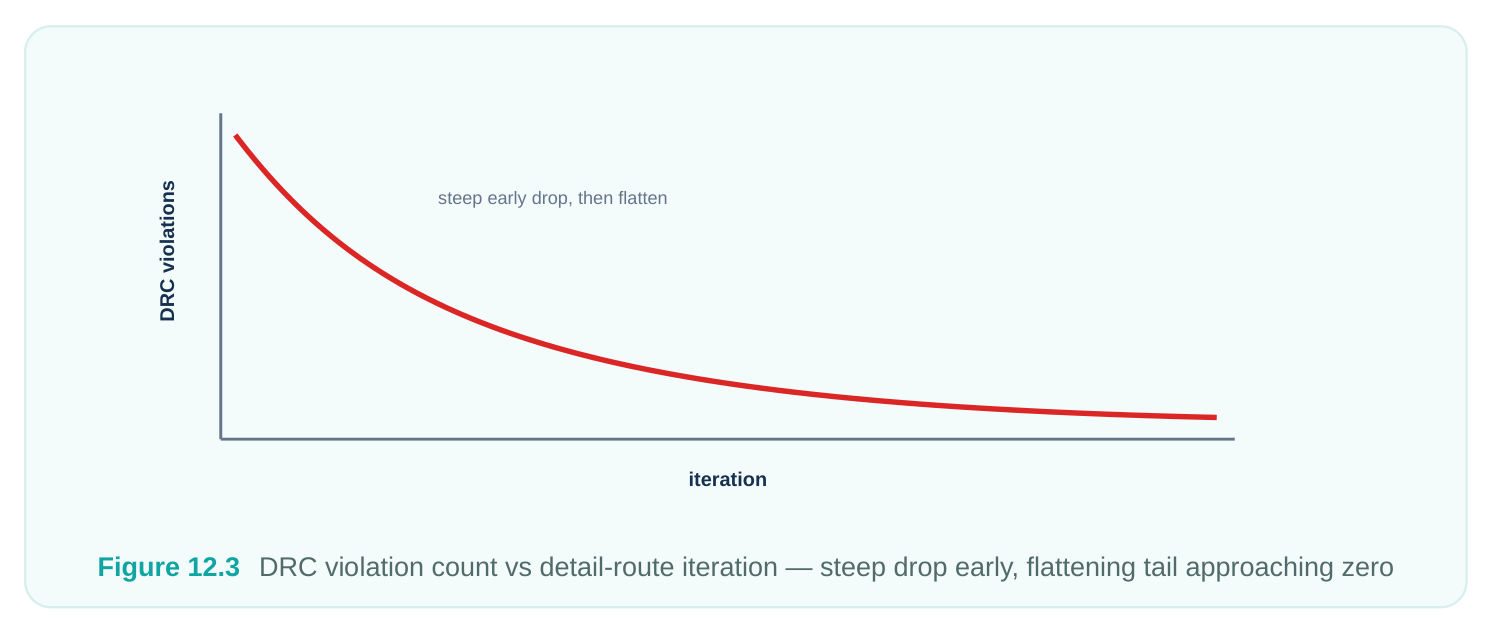
The control you have over this is convergence effort, expressed mainly through the iteration cap and effort options. Setting -max_number_iterations (or -max_detail_route_iterations on auto_route ) too low means the router stops with violations still present; setting it absurdly high wastes runtime grinding on a few stubborn violations that are really a symptom of a deeper problem. The art is recognizing the difference between a block that is converging slowly but surely and one that has plateaued.
# Push detail-route convergence harder on a stubborn block
detail_route \
-max_number_iterations 60 \
-incremental true
# Did it actually converge, or just stop?
report_design_violations -summary
A block that plateaus — violation count stuck at, say, 40 for the last ten iterations — is telling you that those violations are not local and are not fixable by more rerouting. The usual culprits are real congestion hotspots, pin-access problems on a particular cell, or a routing rule that is impossible to satisfy in the available space. Throwing more iterations at a plateau is the most common way
engineers waste a weekend. Look at where the residual violations cluster; if they all sit over one macro corner or one congested channel, the fix is upstream. The table below maps common symptoms to likely causes and the right response.
| Symptom | Likely cause | Right response |
|---|---|---|
| Violations decaying steadily | Normal convergence | Let it run, raise iteration cap if near limit |
| Count plateaus well above | Congestion or pin-access | Inspect cluster location; fix placement/ |
| zero | hotspot | floorplan |
| Many opens on one net | Missed must-join member | Check library pin must-join, re-route the |
net
Antenna violations after clean Long bare metal on one layer Insert diodes or layer-jump, re-run repair
| Violations only near macros | Pin access / blockage at macro | Add routing blockage relief or keepout |
|---|---|---|
| edge | tuning |
Timing-Driven and Crosstalk-Driven Routing
A DRC-clean route that fails timing is a failed route. Timing-driven routing makes the router aware of slack: it reads the timing graph, identifies which nets sit on critical and near-critical paths, and biases its decisions to keep those nets short and direct. Concretely it will spend routing resource to give a critical net a straight, low-detour path on a fast layer, and it will happily make a net with huge positive slack take a longer, more convenient route so the critical net gets the good real estate. Without timing awareness, the router treats a setup-critical net and a slack-rich net identically, which is how you end up with a beautifully legal route that misses your frequency target. Crosstalk-driven routing addresses the other side of signal integrity: coupling. When two nets run parallel and close for a long distance, a transition on one (the aggressor) injects noise onto the other (the victim), causing delay variation and, in the worst case, functional glitches. Crosstalk-driven routing reduces this by limiting parallel run length, increasing spacing on sensitive nets, and steering victims away from strong aggressors. It works hand in hand with the NDR-based shielding and spacing rules you set up earlier — the router honors those rules and additionally makes coupling-aware choices within the freedom it has.
# Enable both signal-integrity optimizations explicitly
set_tool_option -name detail.timing_driven -value true
set_tool_option -name detail.crosstalk_driven -value true
set_tool_option -name global.crosstalk_driven -value true
auto_route -timing_driven true -crosstalk_driven true
report_timing -delay_type max -max_paths 20
The trade-off is real: both modes cost runtime, and crosstalk avoidance in particular consumes spacing, which can worsen congestion. On a congested block, turning crosstalk-driven routing to maximum can actually make things worse by starving the router of the room it needs to legalize. The standard practice is to enable both at a moderate level for the main route, then handle residual timing and noise problems in postroute optimization rather than asking the router to solve everything at once.
Reading the Results: What Success Looks Like
After signal routing, three questions decide whether you move on or go back. First, is it DRC-clean?
report_design_violations should report zero, or a tiny, well-understood set you intend to fix inpostroute. A nonzero count that you cannot explain is a stop sign. Second, is congestion acceptable?
report_congestion should show overflow at or near zero and no large clusters of overcommittedgcells; some local yellow is fine, persistent red is not. Third, is the design connected and timing-sane? Every net routed and joined (including must-joins), no opens, and timing that is at least in the neighborhood of closure so postroute optimization has a tractable job.
# The standard post-route health check
report_design_violations -summary
report_congestion
report_timing -delay_type max -max_paths 10
check_routes
check_routes  is the connectivity verifier — it confirms that every net is fully routed, every pin
reached, and every must-join satisfied, independent of DRC. A block can be DRC-clean and still have an open; check_routes is what catches that. The combination of clean DRC, clean check_routes , acceptable congestion, and reasonable timing is the definition of a route you can hand to postroute optimization. Anything short of that, fix here — it only gets harder downstream.
Interview Q&A
the end-to-end signal routing command. Internally it runs global routing, then track assignment, then detail routing, and then loops detail-route DRC-repair iterations until the design converges or hits the iteration cap. By default it routes all unrouted signal nets and leaves power, ground, and pre-routed nets alone. It is incremental — it can reuse an existing global route — and it accepts timing-driven and crosstalk-driven switches that propagate down to the underlying stages.
and speed. Global routing is fast and produces a congestion map without committing real metal. If the block has fundamental congestion, you see it in minutes and know the fix is floorplan or placement, not router effort. Running detail route on an overcommitted plan wastes hours and still fails. Decoupling the stages lets you validate routability before paying for legalization.
separate pin access points on a cell that the library declares to be electrically the same net and which
the router is required to connect together. Multi-port and memory cells commonly have them. The bug it causes is a phantom open: a net looks routed because it reached one pin, but check_routes flags an open because a sibling must-join member was never connected. The fix is to honor the library must-join requirement and reroute the net.
iterations — a plateau means the violations are not locally fixable by rerouting. Look at where the residual violations cluster. If they sit over one macro corner, one congested channel, or one cell's pins, the root cause is upstream: congestion, pin access, or an unsatisfiable routing rule. The right response is to address placement, floorplan, blockages, or the rule, then re-route — not to grind more detailroute passes against a wall.
avoidance consumes spacing, and spacing is exactly what a congested block lacks. Cranking crosstalk-driven routing to maximum on a tight block starves the router of room to legalize, so DRC convergence gets worse and congestion rises. The balance is to run both timing-driven and crosstalkdriven at moderate strength for the main route, get a clean, connected result, and then clean up residual noise and timing in postroute optimization rather than demanding the router solve every constraint simultaneously.
Key Takeaways
auto_routeruns the full signal routing pipeline — global route, track assignment, detail route, and iterative DRC repair — and is the single command for most blocks; it is incremental and skips power, ground, and pre-routed nets.- The three stages exist as standalone commands (
global_route,assign_tracks,detail_route); runglobal_routealone to judge routability fast before committing to expensive legalization. route_net_grouproutes a named set of nets only, making it the tool for ECOs and for giving a critical bus special handling ahead of the full route.- Must-join pins require the router to tie together multiple access points on one net; a missed member produces a phantom open that
check_routescatches even when DRC is clean. - Pin connections can be single or multiple, and tapering narrows wide or NDR wires down to land legally on small pins — let the library and routing rules drive these rather than hand-forcing.
- Detail routing is intentionally iterative; convergence effort (iteration cap) should be enough to reach zero on a healthy block, but a plateau signals an upstream problem, not a need for more iterations.
- Timing-driven routing keeps critical nets short and direct; crosstalk-driven routing limits coupling but costs spacing, so use both at moderate strength and finish in postroute.
- Success is DRC-clean (
report_design_violations), connected (check_routes, all must-joins satisfied), congestion-acceptable (report_congestion), and timing-sane — anything less should be fixed here, not downstream.
Comments
Leave a Reply