 ChipBuddy
← Home
ChipBuddy
← Home
The Basic Routing Flow
The Basic the router Flow
Routing is where a placed, optimized netlist finally turns into physical metal. Up to this point in the implementation flow, your nets exist only as logical connections between pin locations; after routing, every signal travels along real wire segments on specific metal layers, jumping between layers through vias, while obeying thousands of design rules. the router, the router built into the routing tool, performs this transformation in a disciplined sequence of stages, each one refining the picture left by the previous stage. Understanding that sequence — what each step consumes, what it produces, and how the steps hand off to one another — is the single most useful mental model you can carry into a routing interview or a real debug session. This chapter walks through the canonical end-to-end flow: global routing, track assignment, detail routing, and postroute optimization. We will look at the convenient one-command automatic flow, the reasons you might instead run each stage by hand, the commands for routing a hand-picked group of nets, and how the router drives design-rule violations down to zero across repeated iterations.
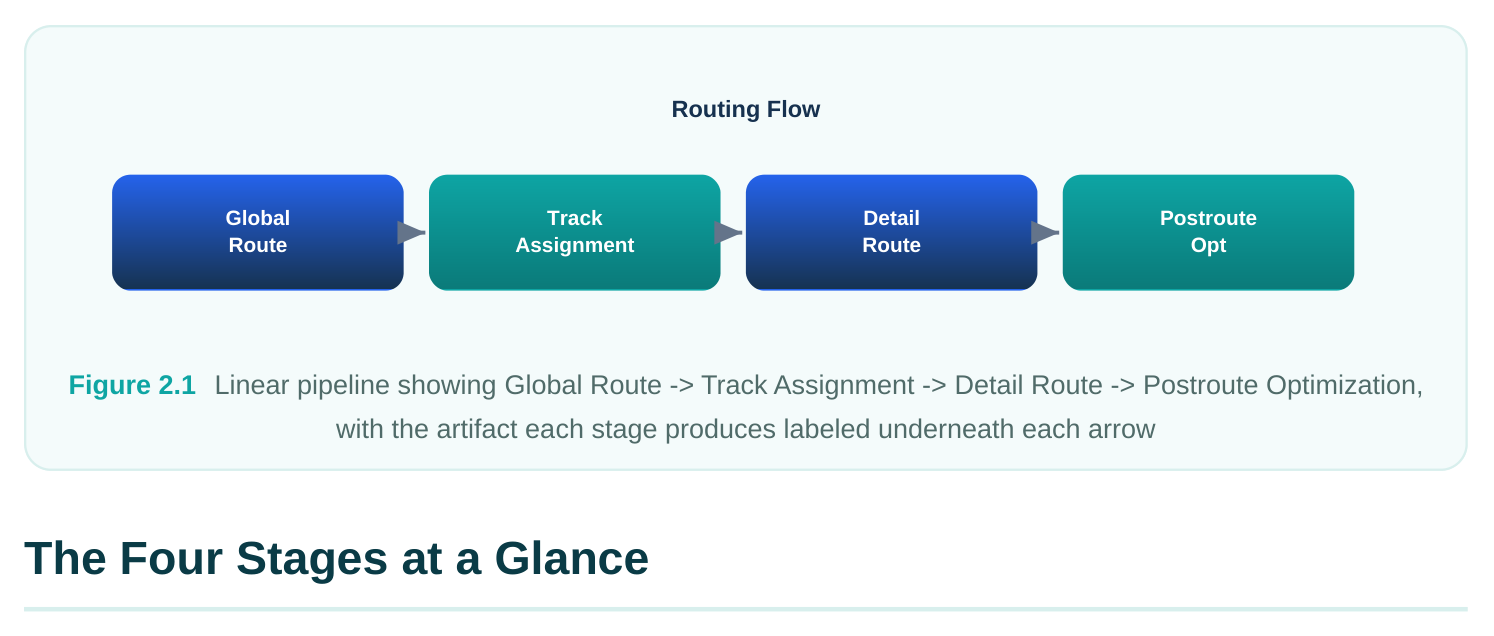
the router decomposes the routing problem into stages because the full problem — placing exact wires for millions of nets on a dozen metal layers without a single violation — is far too large to solve in one shot. Each stage simplifies the problem for the next by making coarse decisions first and progressively committing to detail.
| Stage | Command | Consumes | Produces |
|---|---|---|---|
| Global routing | global_route | Placed netlist, blockages, congestion map | Route guides (coarse paths through global cells) |
| Track assignment | assign_tracks | Global route guides, routing tracks | Long wires snapped onto preferred-direction tracks |
| Detail routing | detail_route | Track-assigned wires, design rules | Actual metal segments and vias, DRC-clean |
| Postroute | postroute_opt | Fully routed, clean design optimization | Timing/DRC/area-improved routed design |
The progression moves from abstract to concrete. Global routing reasons about where roughly a net should go without drawing a single exact wire. Track assignment commits the long, straight portions of nets to specific tracks. Detail routing fills in every remaining connection, pin access, and via, and cleans up rule violations. Postroute optimization then treats the routed result as the new baseline and improves quality of results without throwing the routing away.
Global Routing
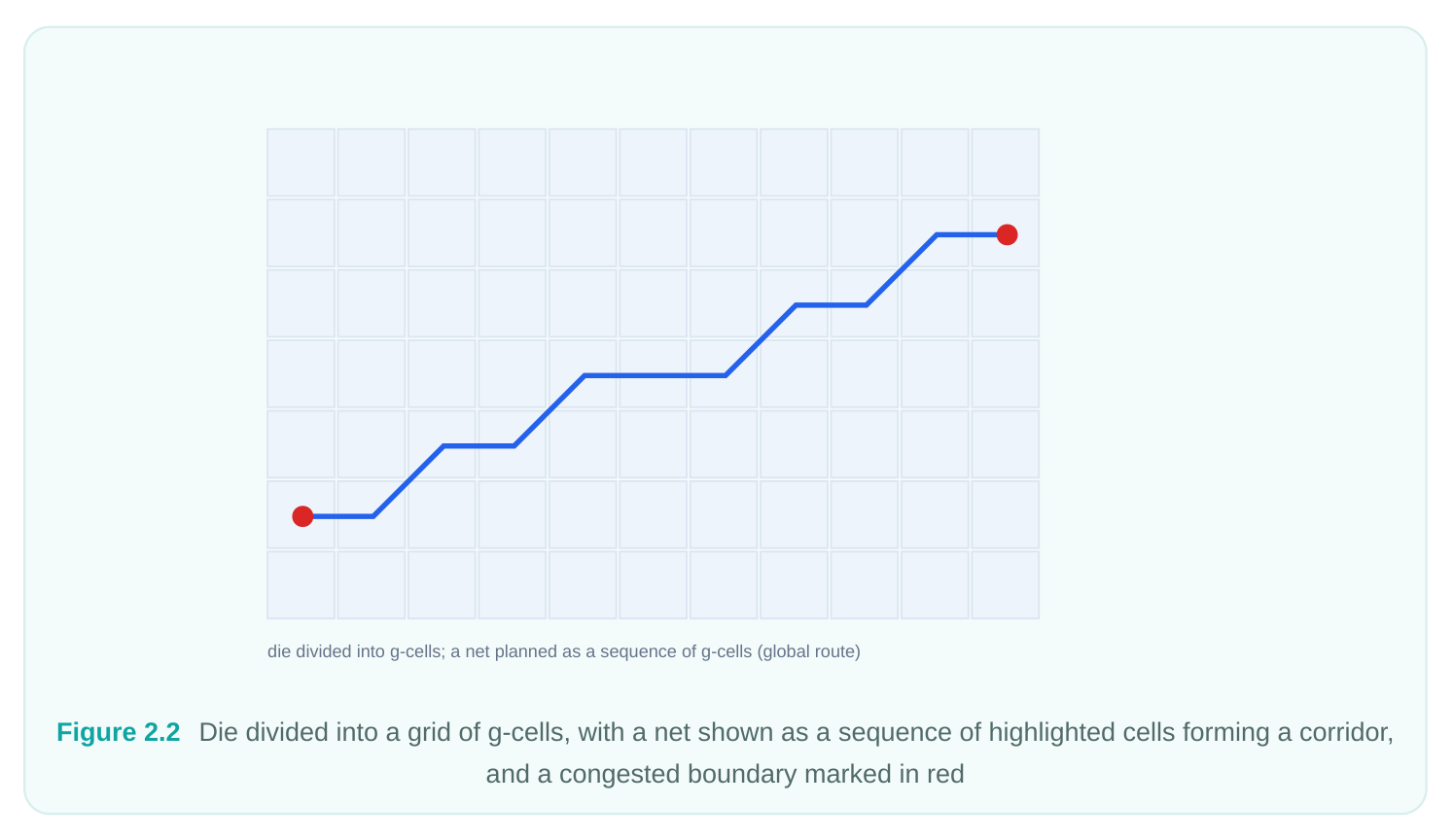
Global routing divides the die into a grid of rectangular regions called global cells (g-cells). Instead of drawing wires, it decides which g-cells each net should pass through and how many wires can cross each g-cell boundary given the available track capacity. The output is a set of route guides — coarse corridors that tell later stages roughly where each net lives. The crucial deliverable here is a congestion picture: global routing estimates demand versus capacity across the chip and reports overflow where too many nets want to cross the same boundary.
Because global routing is fast and produces a reliable congestion map, it is the stage you lean on for floorplan and placement feedback. If global routing shows red congestion hot spots, no amount of clever detail routing will save you; the fix lives upstream in placement or floorplan.
Track Assignment
Track assignment takes the corridors from global routing and assigns the long, straight segments of each net onto actual routing tracks, respecting each layer's preferred routing direction. Modern layers alternate direction — one layer routes mostly horizontal, the next mostly vertical — and track assignment honors that. By committing the bulk of the wiring (the long trunks) to real tracks early, this stage hands detail routing a much smaller, more local problem: it mostly needs to worry about connecting pins to the assigned trunks and resolving short-range conflicts rather than discovering the global path from scratch. Track assignment is also where the router starts caring seriously about resistance and capacitance, since the long wires it places dominate net delay. Wires are spread and assigned with an eye toward minimizing detour and crosstalk on critical nets.
Detail Routing
Detail routing is the workhorse. It draws the exact metal: every wire segment on every layer, every via that stitches layers together, and every careful jog needed to access a pin. This is the only stage that knows about and enforces the full set of foundry design rules — minimum spacing, minimum width, via rules, end-of-line spacing, minimum area, and so on. Detail routing operates in iterative passes: it routes everything, finds the remaining design-rule violations (DRCs) and shorts, then rips up and reroutes the offending areas. It repeats this search-and-repair loop until the violation count converges, ideally to zero.
The output of detail routing is a fully physical, DRC-clean (or nearly clean) routed design. Everything downstream — extraction, signoff timing, fill — depends on this geometry being correct.
pin A M3
pin B joined by a via
Figure 2.3 Close-up of two pins connected by exact metal segments on M3 and M4, joined by a via, with spacing
arrows annotating a design-rule check
Postroute Optimization
Once the design is fully routed, the routing is no longer just a connectivity exercise — it is a timing and signal-integrity reality. Postroute optimization closes the gap between "connected and legal" and "meets the spec." It can resize cells, insert or remove buffers, reroute selected nets, and fix remaining DRC, all while keeping the design routed. Crucially, it works incrementally: it does not blow away your routing and start over. It surgically modifies the parts that need help and re-routes only what it touched.
The One-Step Automatic Flow
For the common case, you do not invoke the four stages by hand. The auto_route command runs global routing, track assignment, and detail routing back to back, managing the handoffs and iteration internally. This is the default way most engineers route a block.
# Fully automatic routing: global + track + detail in one command
auto_route
# Inspect the result
report_design_violations
report_global_route_congestion
auto_route is convenient because it picks reasonable internal effort levels, runs the detail-route iteration loop to convergence, and stops with a routed design. You can still influence its behavior through options and through the many set_tool_option settings that govern router effort, layer constraints, and DRC handling, but you are letting the tool orchestrate the stages. The trade-off is visibility. When auto_route finishes with stubborn DRCs or congestion, you lose the chance to inspect the design between stages. That is exactly when engineers drop down to running the stages individually.
Running the Stages Individually
Running each stage by hand gives you a checkpoint after every step. You can save the database, study the congestion map after global routing, confirm track usage after track assignment, and only then commit to the expensive detail-route pass. This is the preferred approach when you are debugging a hard-to-route block or experimenting with router settings.
# Stage 1: global routing — build route guides and a congestion map
global_route
report_global_route_congestion
# Stage 2: track assignment — snap long wires onto tracks
assign_tracks
# Stage 3: detail routing — draw real metal and vias, clean DRCs
detail_route
# Check what remains
report_design_violations
The decomposition is functionally equivalent to auto_route , but with control. If global routing reveals congestion you cannot live with, you stop right there — there is no point spending an hour on detail routing a design that is structurally congested. Fix placement, rerun global routing, and only proceed when the congestion map is clean.
| Approach | When to use | Main benefit |
|---|---|---|
| auto_route | Routine routing, healthy floorplans | Speed and simplicity |
| Individual stages | Debug, congestion analysis, tuning | Inspection checkpoints between stages |
| route_net_group | Routing a specific net set | Targeted control over selected nets |
Routing a Selected Set of Nets with route_net_group
Sometimes you do not want to route the whole design — you want to route a particular set of nets, perhaps after manually pre-routing some critical signals or after an ECO that touched only a handful of connections. The route_net_group command routes a named collection of nets through the globaltrack-detail pipeline while leaving everything else untouched.
# Route only the nets in a specific bus, end to end
route_net_group -nets [get_nets "data_bus*"] -all_stages true
# Route a single critical net by itself
route_net_group -nets [get_nets "clk_gate_en"]
route_net_group is invaluable for incremental work. After fixing a few nets with an ECO, you do not want to disturb the thousands of nets that are already clean. Routing just the affected group keeps the rest of the design stable and finishes in seconds rather than re-running a full route. It is also the tool of choice when you have a special routing strategy for one bus or one clock net and want to apply it in isolation.
Postroute Optimization: postroute_opt and
advanced_postroute_opt
After the design is routed, postroute_opt is the engine that improves it. It performs postroute timing optimization — fixing setup and hold violations, recovering area, and cleaning up signal integrity — while preserving the routed state and repairing any DRCs its edits introduce.
# Standard postroute optimization: timing + DRC + SI cleanup
postroute_opt
# Hold-focused postroute optimization
postroute_opt -only_hold_time
# Confirm the design is clean and timing has improved
report_design_violations
report_qor
In newer the routing tool releases, the postroute work is often driven through the hyper-optimization path, exposed via advanced_postroute_opt (and the broader hyper-flow set_tool_option that enable concurrent, multi-objective optimization). Functionally, advanced_postroute_opt plays the same role as postroute_opt — it is the postroute optimization step — but it folds timing, power, area, and DRC repair into a more tightly integrated, concurrent engine rather than a sequence of separate passes. In an interview, the key point to convey is that both occupy the same slot in the flow: they run after routing to improve QoR without de-routing the design. A typical postroute loop alternates optimization with violation checking, and you stop when timing closes and the violation count holds at zero.
The Full Route Command Sequence
Putting it together, a representative full-route script for a block looks like the following. The pattern is: route everything automatically, optimize, then verify and iterate if needed.
# --- Full routing flow ---
# 1. Route the entire design (global + track + detail)
auto_route
# 2. Check congestion and DRC before optimizing
report_global_route_congestion
report_design_violations
# 3. Postroute optimization for timing, area, SI, and DRC
postroute_opt
# 4. Verify QoR and violations after optimization
report_qor
report_design_violations
# 5. If violations remain, run an incremental detail-route pass
detail_route -incremental true
# 6. Final signoff-style check
check_routes
Incremental vs Full Routing
Knowing when to run a full route versus an incremental one is a core skill. A full route — auto_route or the three stages from scratch — is the right choice the first time you route a block, or after any change large enough to invalidate the existing routing: a placement re-spin, a major floorplan change, or a big netlist edit. You want the router to make global decisions with full freedom. An incremental route is the right choice after small, localized changes. If a postroute ECO swapped a few cells or added a buffer, you do not want to rip up a clean design. Run detail_route -incremental true or route_net_group on the affected nets so the router only repairs the disturbed region and leaves everything else exactly where it is. Incremental routing is faster, more predictable, and preserves the timing closure you already achieved on the untouched nets.
| Situation | Recommended action |
|---|---|
| First route of the block | Full route ( auto_route ) |
| Major placement/floorplan change | Full route from scratch |
| Postroute timing ECO (few cells) | Incremental ( detail_route -incremental true ) |
| A handful of new/changed nets | route_net_group on those nets |
| Residual DRCs after postroute_opt | Incremental detail route |
DRC Convergence and Iterations
The most important thing to understand about detail routing is that it is iterative by nature. The router cannot guarantee a clean result in a single pass because routing one net affects the legal options for its neighbors. So the router routes everything, then enters a repair loop: it scans for design-rule violations and shorts, identifies the offending regions, rips up the problematic wires, and reroutes them — often with relaxed or alternate strategies. Each iteration should reduce the total violation count.
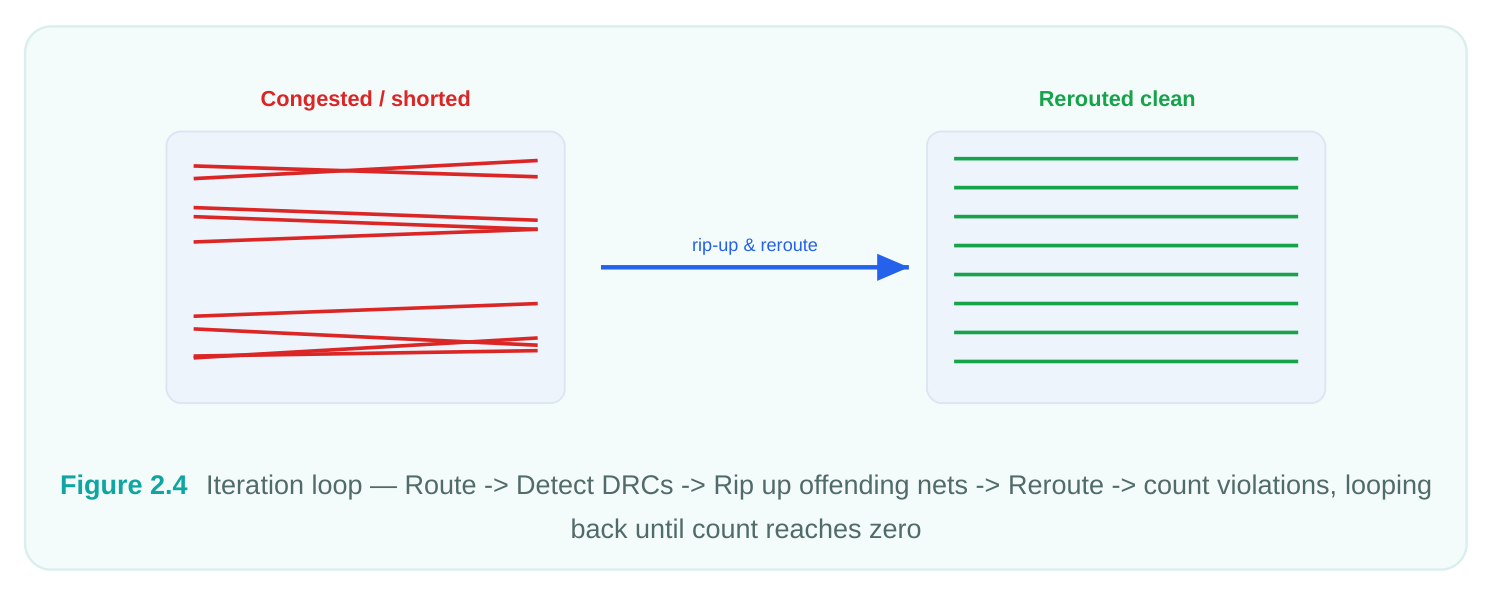
Convergence means the violation count drops toward zero and stabilizes across successive iterations. A healthy block converges quickly: the first pass leaves thousands of violations, the next few passes knock them down by orders of magnitude, and the final passes clean up the stragglers. A block that does not converge — where the violation count plateaus at a stubborn number or oscillates up and down — is telling you something structural is wrong. The usual culprits are local congestion, pinaccess problems (pins too close together or blocked), narrow channels, or overly aggressive design rules in a tight region. When convergence stalls, the answer is rarely "run more router iterations"; it is to go look at where the violations cluster and fix the underlying placement or constraint issue. You monitor convergence with the violation reports between iterations. If you are running stages by hand, you can run additional detail_route passes and watch the count after each. The router exposes effort and iteration controls through set_tool_option so you can push harder on a difficult block, but raising effort only helps when the problem is genuinely solvable and merely hard — it will not rescue a fundamentally over-congested region.
Interview Q&A
and detail_route separately? auto_route is a wrapper that runs all three routing stages back to back, managing the handoffs and the detail-route iteration loop internally — it is the convenient default. Running the stages individually produces the same routed result but gives you inspection checkpoints between each stage. The
practical value of the manual flow is debugging: you can examine the congestion map right after global_route and decide whether the design is even worth detail routing before you spend the time on it.
Global routing produces route guides — coarse corridors through a grid of global cells — and, just as importantly, a congestion map showing where wiring demand exceeds track capacity. It is useful before detail routing because it is fast and predictive: if global routing shows heavy congestion, that is a floorplan or placement problem that detail routing cannot fix. You use the congestion map as early feedback to fix the design upstream rather than discovering the problem after an expensive full route.
run auto_route ? You route incrementally — either detail_route -incremental true or route_net_group on just the affected nets. Re-running auto_route would rip up a clean, timing-closed design and let the router make fresh global decisions everywhere, which risks disturbing thousands of nets that were already fine and losing your timing closure. Incremental routing repairs only the disturbed region, is far faster, and preserves the rest of the design exactly as it was.
tell you and what do you do? Non-convergence — a violation count that plateaus or oscillates instead of trending to zero — signals a structural problem, not a router-effort problem. The likely causes are local congestion, pin-access issues, or narrow routing channels. The right move is to look at where the violations cluster (they almost always concentrate in a small region) and fix the root cause: spread the placement in that area, address pin access, or relax a too-tight floorplan constraint. Simply increasing router iterations or effort will not help if the region is genuinely over-congested.
Key Takeaways
- the router solves routing in four progressive stages — global routing, track assignment, detail routing, and postroute optimization — each committing more detail than the last.
auto_routeruns the three routing stages automatically and is the default; runningglobal_route/assign_tracks/detail_routeby hand trades speed for inspection checkpoints between stages.- Global routing's congestion map is your earliest and cheapest feedback: red congestion is a floorplan/placement problem that detail routing cannot rescue.
- Use
route_net_groupto route a selected set of nets and incremental detail routing for small ECOs; reserve full routes for the first pass and major design changes. postroute_opt(and the integratedadvanced_postroute_optin the hyper flow) is the postroute optimization step — it improves timing, area, SI, and DRC while keeping the design routed.- Detail routing converges through an iterative rip-up-and-reroute loop; a stalled violation count points to a structural issue to fix upstream, not to more router effort.
Comments
Leave a Reply