 ChipBuddy
← Home
ChipBuddy
← Home
Running STA, Reading Reports & Sign-off
This is where everything comes together. You have a netlist (the gate-level circuit). You have a timing library (cell delay models). You have parasitics (wire resistance and capacitance). You have constraints (the timing rules). Now you must run the tool. You read the numbers it prints. You decide which numbers matter. You fix what is broken. Then you declare the design closed. This chapter turns knowing STA into doing STA. Interviewers probe exactly this. They often ask, "Walk me through closing timing on a block."
The Practical STA Run
A static timing run is ordered and repeatable. You feed the tool data in five groups. You set up the analysis. You let timing flow through the circuit. Only then do you ask for reports. Skipping a step gives quiet, wrong answers. For example, asking about a path before loading parasitics gives an optimistic, wire-free result.
| Step | What you load / do | Why it matters |
|---|---|---|
| 1. Libraries | .lib / .db cell timing models for each | Defines cell delay, transition, setup/hold |
corner
- 2. Netlist Synthesized or post-layout gate-level netlist The structural graph to be timed
- 3. Link Resolve every instance to a library cell Unlinked cells = black holes, zero delay
- 4. Parasitics Extracted RC (SPEF) per corner Real net delay; without it nets are ideal
- 5. Constraints SDC: clocks, I/O, exceptions Defines what is being checked
- 6. Analysis Corners, modes, OCV/derate, CPPR, SI Defines how pessimistically it is
| setup | checked | |
|---|---|---|
| 7. Update | Propagate clocks, delays, slews | Builds the timing graph |
| 8. Report | Paths, summaries, DRV, skew | Your evidence for sign-off |
# illustrative — generic, not tool-specific
read_lib   ./libs/ss_0p72v_125c.lib
read_verilog ./netlist/core_routed.v
link_design  core_top
read_parasitics ./spef/core_ss_125c.spef
read_sdc     ./constraints/core.sdc
set_analysis_mode -corner SS -voltage 0.72 -temp 125
update_timing
# standard (SDC) — these are the constraints loaded above
create_clock -name clk -period 2.500 [get_ports clk]
set_clock_uncertainty 0.100 [get_clocks clk]
set_input_delay  0.500 -clock clk [get_ports din*]
set_output_delay 0.450 -clock clk [get_ports dout*]
set_propagated_clock [get_clocks clk]
An STA run
| read | set | update timing | generate reports |
|---|---|---|---|
| libs/netlist/SPEF/SDC | corners/modes/OCV/SI |
Figure 14.1 STA run flow — libs+netlist+SPEF+SDC feeding an "update_timing" engine, branching out to four
report buckets (paths, summary, DRV, clock)
Anatomy of a Timing-Path Report
The path report is the most important output in STA. Learn to read it well. The rest then follows. A path report tells the story of one trip. Data leaves the launch flop (the start register). It travels to the capture flop (the end register). The report shows where data starts. It shows the delay it picks up. It shows the deadline. It shows if data beat the deadline (positive slack) or missed it (negative slack). Read it as two columns in a race. The arrival path adds delay step by step. It runs from the launch flop clock pin to the capture flop D pin. The required path computes the deadline. It takes the capture clock edge. It adds the clock network delay. It subtracts the library setup time. It subtracts the uncertainty. Slack is required minus arrival for setup. Slack is arrival minus required for hold.
| Report line | What it means | How to read it |
|---|---|---|
| Startpoint | Launch flop CK pin (or input | Where the data is launched |
port)
Endpoint Capture flop D pin (or output Where it must arrive in time
Path Group Clock/group the path belongs to Tells you which constraint governs
| Path Type | max (setup) or min (hold) | Which check is being reported |
|---|---|---|
| clock clk (rise edge) | Launch edge time, e.g. 0.000 | Start of the data clock path |
| clock network delay | Source-to-launch-CK latency | Insertion delay on launch side |
| Cell arc (e.g. U12/Q ) | Incremental cell delay | A big number here = slow gate |
| Net arc (e.g. n47 (net) ) | Incremental wire delay | A big number = long/high-fanout net |
| data arrival time | Cumulative total at endpoint | The horse that must beat the |
deadline
clock clk (rise edge) Next capture edge, e.g. 2.500 Start of the required calculation
| clock network delay capture | Capture-side CK latency | Add to required (helps setup) |
|---|---|---|
| clock uncertainty | Jitter + margin | Subtracted from required |
| library setup time | Capture flop's setup | Subtracted from required |
| CPPR / CRPR credit | Common-path pessimism | Adds back over-counted skew |
removed
| data required time | The deadline | The bar the arrival must clear |
|---|---|---|
| slack | required − arrival | Negative = violation |
Read the report top to bottom once. This shows you the structure. Then scan the incremental delay column. Find the few large numbers. Most debugging is finding the one or two arcs that dominate. Slack = required −arrival
arrival (forward) required +cell required time
| +net | slack = req −arrival |
|---|---|
| +cell | positive →met |
@D
Figure 14.2 Side-by-side data-arrival column vs required-time column, with slack as the gap between the two
totals
Other Essential Reports
The path report does not work alone. Sign-off needs a set of reports. Each one answers a different question. The skill is knowing the red flag each one raises.
| Report | What it shows | Red flag |
|---|---|---|
| Constraint / violation | WNS & TNS for setup and hold per | Any negative WNS; large TNS = many |
| summary | group | failures |
| Design rule (DRV) report | Max transition, max capacitance, max | Slew/cap exceeding library limits |
fanout
| Clock skew / latency | Insertion delay, skew between launch/ | Excessive skew silently eating slack |
|---|---|---|
| report | capture | |
| Unconstrained paths | Endpoints with no timing check | Real logic going untimed |
| Exceptions report | False paths, multicycles, min/max | An exception masking a true failure |
delays
Bottleneck / fanout report Cells appearing in many failing paths One cell limiting the whole design the sum of all negative slacks. WNS tells you how bad. TNS tells you how widespread. A WNS of −60 ps with a TNS of −60 ps is one lonely path. That is easy. The same WNS with a TNS of −15 ns is a systemic problem. That usually points to a clocking or constraint issue, not one slow gate.
# illustrative — generic, not tool-specific
report_timing -delay max -path_group clk -max_paths 20 -slack_lesser_than 0
report_constraint -all_violators -summary
report_design_rule -max_transition -max_capacitance
report_clock_skew -setup
report_unconstrained_paths
report_exceptions -ignored
A Debugging Methodology
A path fails. Do not randomly upsize gates. Work the path in order. Your goal is to find the dominant contributor. Then apply the cheapest fix that recovers the slack.
- 1. Confirm the check is real. Is the path constrained correctly? Is it a true functional path? Or should
it be a false or multicycle path? A "violation" on a dead path is noise. But only mask it if you can prove it.
- 2. Scan the incremental delay column. Where is the time going? Add up the cell delays. Add up the
net delays. If nets dominate, it is a placement, routing, or buffering problem. If cells dominate, it is a logic-depth or drive-strength problem.
- 3. Look for the single big arc. One slow cell can lose most of the slack. So can one fat net. A wrong
Vt flavor, an undersized cell, a high fanout, or a long route are common.
- 4. Check the clock side. Negative slack can come from skew, not the data path. The capture clock
may arrive too early for setup. It may arrive too late for hold. Read the clock network delays.
- 5. Account for pessimism. Is CPPR/CRPR enabled? Is the derate too high? Double-counting
variation on a long common clock segment can make a fake violation.
- 6. Check SI. Is crosstalk adding delta delay? An aggressor net switching at the same time can add
tens of picoseconds to a victim net.
| Symptom in the report | Likely cause | Typical fix |
|---|---|---|
| One cell delay huge | Undersized / high-Vt cell | Upsize / swap to lower-Vt |
| Net delay huge | Long route, high fanout | Buffer, split load, re-place |
| Many small cell delays | Excessive logic depth | Restructure / pipeline |
| Slack lost on clock side | Skew, latency imbalance | Fix CTS / balance clock |
| Violation only at one corner | Corner-specific weakness | Corner-aware sizing |
| Vanishes with CPPR on | Double-counted pessimism | Enable CRPR/CPPR |
| Delta delay inflates arc | Crosstalk (SI) | Spacing, shielding, re-route |
Here is a simple mental model. Slack is a budget. Every arc is a line item. Debugging is auditing the budget to find the overspend.
Common STA Pitfalls
The mistakes that embarrass engineers are rarely exotic. They are almost always one of a few common traps. Interviewers love them. They separate people who have closed a design from people who have only read about it.
| Pitfall | What goes wrong | How to avoid |
|---|---|---|
| Missing constraints | Untimed paths reported as "met" by default | Always run unconstrained-path report |
| Over-aggressive | A false path mask hides a real failure exceptions | Justify every exception; review the list |
| Lib/parasitic mismatch | SS netlist timed with FF parasitics | Lock corner consistency in the flow |
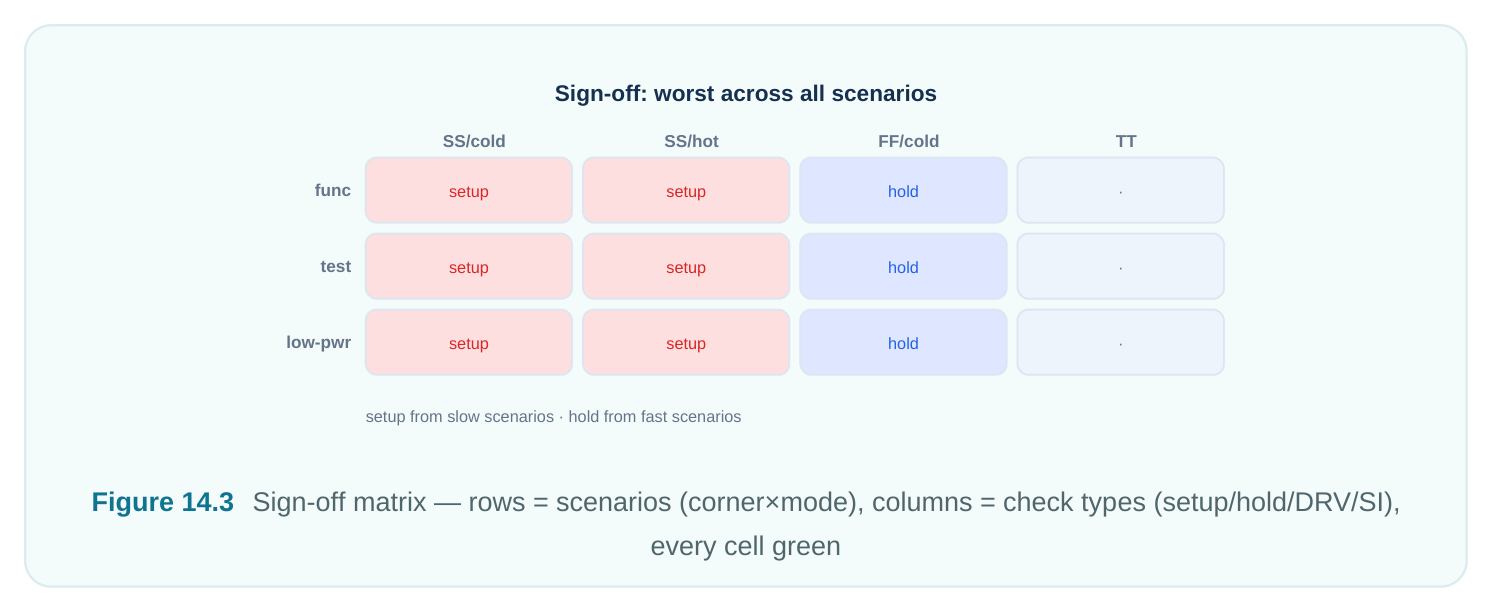
| Ignoring a corner | Hold fails at FF/fast, setup at SS/slow | Run all sign-off corners, every time |
| Double-counted pessimism | OCV derate applied on common clock | Enable CPPR/CRPR |
path
| Ideal clocks left on | set_propagated_clock forgotten | Propagate clocks before sign-off |
|---|---|---|
| Wrong I/O delays | Stale or guessed input/output delays | Derive from real interface budgets |
| Loop/combinational | Tool breaks loop arbitrarily feedback | Find and constrain/disable explicitly |
The worst of these is the exception trap. A set_false_path is a promise. It tells the tool "this path never matters." If that promise is wrong, you did not fix a violation. You hid it. Silicon will find it for you. So treat every exception as a claim you must defend.
STA Sign-Off Checklist
Sign-off is a formal statement. It says timing is closed across the whole operating space. It is not "the WNS is positive in the one run I opened." It is a grouped, complete check across every scenario the chip will see. Walk this list before you say "closed." Setup (max-delay) timing - [ ] WNS ≥ 0 in every corner × mode scenario - [ ] TNS = 0 (no residual negative slack anywhere) - [ ] Worst paths reviewed, not just the summary number Hold (min-delay) timing - [ ] Hold WNS ≥ 0 across all scenarios (especially fast corner) - [ ] Hold checked after clock propagation, not on ideal clocks - [ ] Hold not traded away while fixing setup Design rule violations (DRV) - [ ] Max transition clean in all corners - [ ] Max capacitance clean - [ ] Max fanout within limits Signal integrity (SI) - [ ] Crosstalk delta delay accounted for in path delays - [ ] No glitch/noise failures on sensitive nets - [ ] SI-aware analysis enabled for sign-off corners
Constraints & exceptions - [ ] Zero unconstrained / uncovered paths - [ ] Every false path and multicycle reviewed and justified - [ ] No exception masking a genuine failure Pessimism & consistency - [ ] CPPR/CRPR enabled - [ ] OCV / derate set per methodology, not double-applied - [ ] Results consistent across all multi-corner multi-mode scenarios - [ ] Same netlist + parasitics + corner triplet used coherently
| Sign-off axis | Pass condition | Most common miss |
|---|---|---|
| Setup | WNS ≥ 0, all scenarios | Forgetting a corner |
| Hold | WNS ≥ 0, all scenarios | Ideal clocks during check |
| DRV | All within library limits | Transition violations ignored |
| SI | Delta delays included | SI off in one corner |
| Constraints | No unconstrained paths | Untimed I/O |
| Exceptions | All justified | False path hiding a real fail |
| Pessimism | CPPR on, no double derate | Phantom common-path violations |
Consolidated Quick Reference
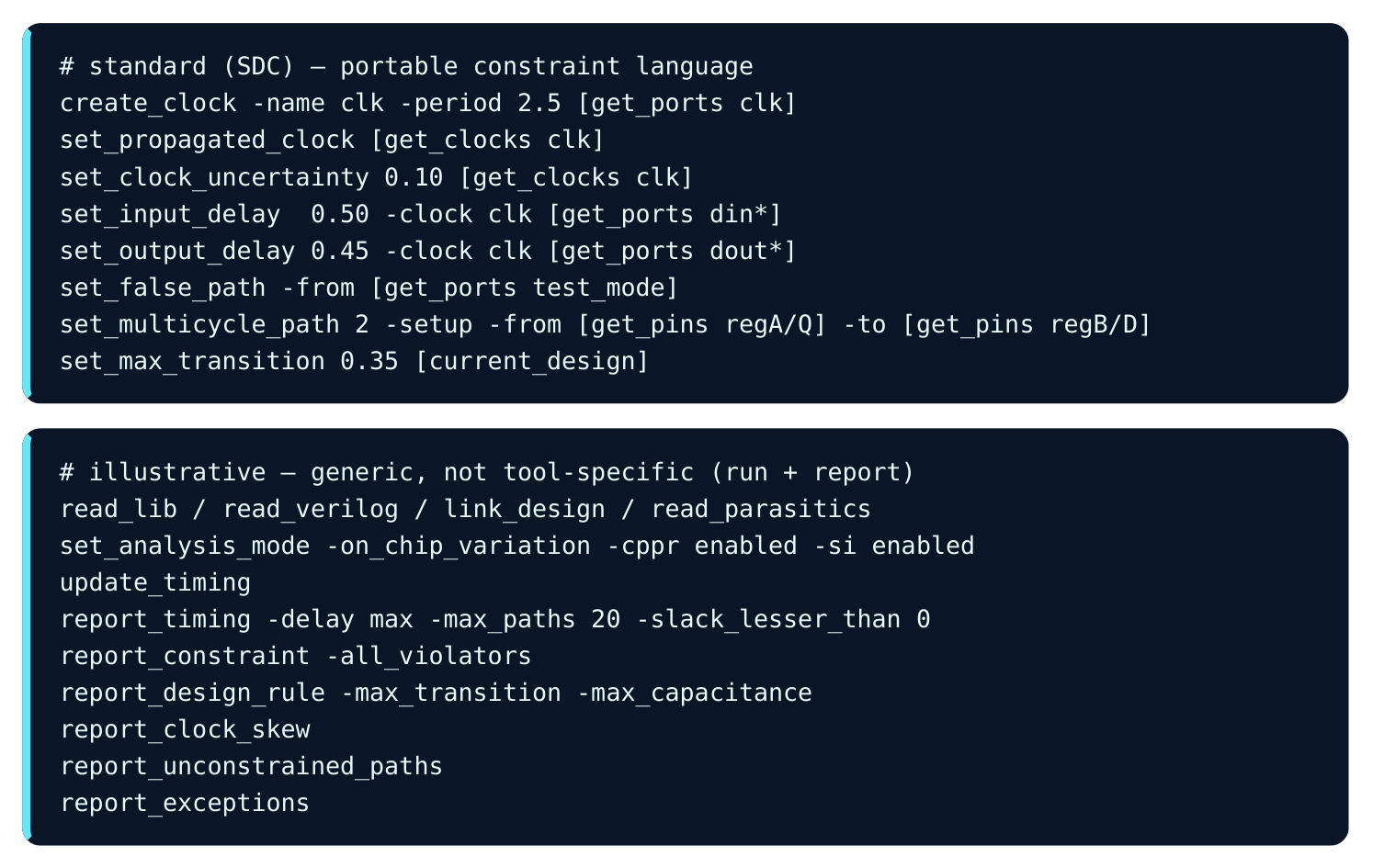
Keep the real and the illustrative apart. SDC commands are the portable, standard language you write. Run and report commands change by tool. The ones below are generic stand-ins. They show intent, not exact syntax.
Interview Q&A
worst negative slack. TNS is the sum of all negative slacks. You usually attack WNS first. The worst path sets the top frequency. But a large TNS with a small WNS points to a systemic issue. That issue is often clocking or constraints. One fix can then clear many paths.
delay column. Compare the summed cell delay against the net delay. Look for a single oversized arc. Then check the clock side for skew. Confirm whether CPPR and SI are raising or lowering the number.
the common clock segment. The launch and capture paths share that segment. So pessimism was counted twice. CPPR/CRPR removes that extra skew. The fake slack comes back.
really functional, you masked a real failure. You did not fix it. Silicon will expose it. So every exception must be provably correct.
arrives too soon for the capture edge. That is worst when cells are fast and real skew exists. Ideal clocks hide skew. The slow corner hides the fast-data case. So neither would reveal the true hold risk.
Key Takeaways
- An STA run is an ordered pipeline: libraries → netlist → link → parasitics → constraints → analysis setup → update → reports. Order and corner consistency are non-negotiable.
- The path report is the core artifact. Read the arrival column against the required column. Slack is simply the gap between them.
- Use the right report for the right question. Use the summary for breadth (WNS/TNS). Use the path report for depth. Use DRV, skew, SI, unconstrained, and exceptions for the rest.
- Debug by auditing the slack budget. Find the dominant arc. Check the clock side. Account for pessimism and SI before sizing anything.
- The fatal pitfalls are missing constraints, wrong exceptions, lib/parasitic mismatch, ignoring a corner, and double-counted pessimism.
- Sign-off is grouped and exhaustive. Setup and hold must be clean across every scenario. DRV must be clean. SI must be clean. No path is unconstrained. Every exception is justified. CPPR is on. Multi-corner results agree. Only then is timing truly closed.
Comments
Leave a Reply