 ChipBuddy
← Home
ChipBuddy
← Home
The Constraint Language — Tcl & SDC
SDC Sits on Top of Tcl
The SDC constraint format is not its own language. It is a set of commands written in Tcl (a simple scripting language, pronounced "tickle"). Every SDC file is really a Tcl script. That single fact explains most of how SDC behaves. Because SDC is Tcl, you get real programming features for free. You can store values in variables. You can loop over a list of ports. You can build a name from pieces. A constraint file is a program, not just a list of settings. This also means SDC follows Tcl syntax rules. Commands are words separated by spaces. Square brackets run a command and substitute its result. Curly braces group text without changing it. Getting these rules right is half of writing clean constraints.
The benefit is portability. Because the SDC commands are standardized and Tcl is standardized, the same file runs across many compliant tools. You write the contract once and reuse it everywhere in the flow.
Variables and Reuse
A variable stores a value under a name. In Tcl you set it with set and read it back with a dollar sign. This lets you write a number once and reuse it everywhere, which prevents copy-paste mistakes. Variables shine for shared numbers like the clock period. If the period appears in five places and you hard-code 3.2 ns in each, a change means five edits and a chance to miss one. With a variable, you change it once.
# standard SDC — portable across compliant tools
# Store shared numbers once, reuse them everywhere
set CLK_PERIOD 3.2
set IN_MARGIN  [expr {0.35 * $CLK_PERIOD}]
set OUT_MARGIN [expr {0.30 * $CLK_PERIOD}]
create_clock -name sys_clk -period $CLK_PERIOD [get_ports clk]
set_input_delay  -clock sys_clk $IN_MARGIN  [get_ports din]
set_output_delay -clock sys_clk $OUT_MARGIN [get_ports dout]
Here expr does math, so the input margin becomes 35 percent of the period automatically. If you later change the period to 2.8 ns, every derived number updates with no extra edits.
| Tcl piece | Meaning | Example |
|---|---|---|
| set name value | Store a value | set CLK_PERIOD 3.2 |
| $name | Read a stored value | -period $CLK_PERIOD |
| [command] | Run command, use its result | [get_ports clk] |
| {text} | Group without substitution | {din[3]} |
| expr {math} | Do arithmetic | [expr {0.35 * 3.2}] |
Object-Access Commands
Constraints must point at real things: ports, pins, clocks. You do not name them as bare strings. You fetch them with get_* commands. These return objects the tool understands, not just text. The three you use most are get_ports , get_pins , and get_clocks . A port is a pin on the chip boundary. A pin is a connection point on a cell inside the chip. A clock is a clock object you defined earlier. Each get_* finds the matching objects by name. These commands accept patterns. An asterisk matches any characters, so get_ports {data[*]} grabs every bit of a bus named data. This saves you from listing 32 pins by hand and keeps the constraint short.
# standard SDC — portable across compliant tools
# Point constraints at real objects, with patterns for buses
set_input_delay  -clock sys_clk 1.10 [get_ports {addr[*]}]
set_output_delay -clock sys_clk 0.90 [get_ports {rdata[*]}]
set_load 0.05 [get_ports {rdata[*]}]
set_disable_timing [get_pins ff_a/CLK]
Always fetch objects with get_* rather than typing raw names. If a name does not exist, get_* returns nothing, and the tool warns you. A raw string typo can pass silently and leave a constraint doing nothing.
Collections and Patterns
A get_* command does not return one object. It returns a collection (an ordered group of objects). You can store a collection in a variable and reuse it, just like a number. This is how you apply many constraints to the same set of pins. Collections make scripts both shorter and safer. You select the set once, check it is not empty, and then constrain it. If the selection is empty, you catch the mistake early instead of finding a missing constraint at sign-off.
# standard SDC — portable across compliant tools
# Capture a collection once, reuse it for several constraints
set DATA_OUTS [get_ports {dout[*]}]
set_output_delay -clock sys_clk 0.90 $DATA_OUTS
set_load 0.04 $DATA_OUTS
set_max_transition 0.40 $DATA_OUTS
Patterns are powerful, so use them carefully. A pattern like * with no qualifier can grab far more than you meant. Always confirm a pattern selects exactly the objects you expect, especially on a large design.
| Selector | What it matches |
|---|---|
| [get_ports clk] | One port named clk |
| [get_ports {d[*]}] | Every bit of bus d |
| [get_pins blk/ff/D] | The D pin of a specific flip-flop |
| [get_clocks sys_clk] | The clock object sys_clk |
| [all_inputs] | Every input port on the chip |
Units, Comments, and Why Scripts Win
Units must be consistent across the whole file. The tool uses a base time unit, often nanoseconds. If you mix nanoseconds and picoseconds, the numbers silently mean the wrong thing. Pick one unit, state it in a comment, and stick to it. A subtle bug: writing 0.3 when you meant 300 picoseconds is fine in nanoseconds, but writing 300 in a nanosecond file means 300 ns, a thousand times too large. Always confirm the file's time unit before reading any number.
# worked example — unit consistency
File time unit: nanoseconds (ns)
Intended input delay: 350 picoseconds
Correct value to write:   0.35   (because 350 ps = 0.35 ns)
WRONG value:              350     (this means 350 ns, ~1000x too big)
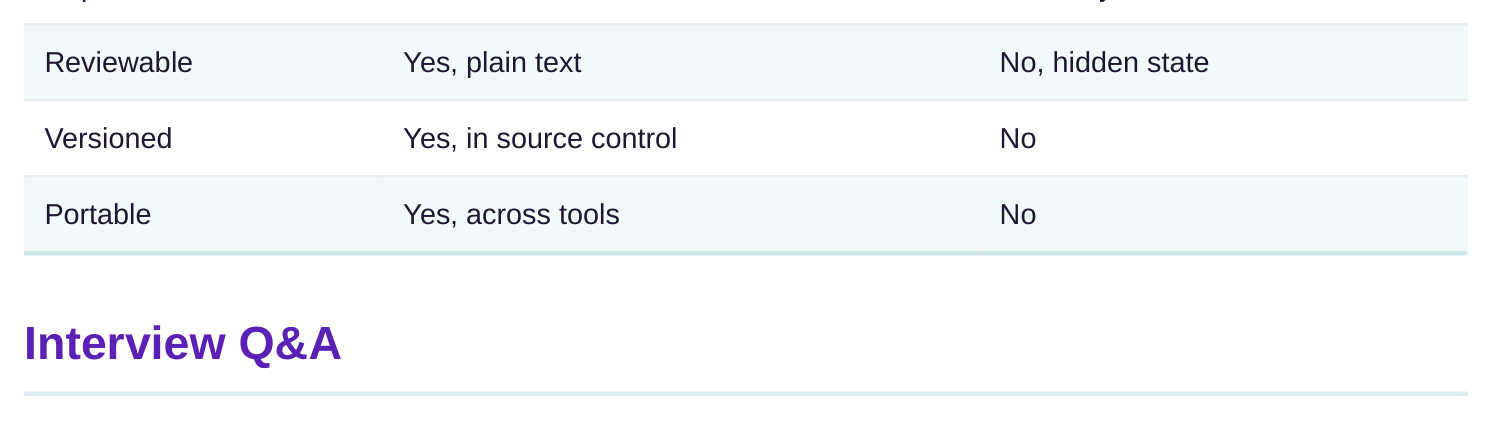
Comments explain intent. A line starting with # is ignored by the tool but read by humans. Good comments say why a constraint exists, not just what it does. The reason "this path is multicycle because the block runs at quarter rate" saves the next engineer hours. Scripts beat clicking through menus for three reasons. A script is repeatable: the same file gives the same result every run. A script is reviewable: a teammate can read every decision. And a script is versioned: you can track every change and revert a bad one. Menu settings vanish when the session closes.
| Quality | Script (SDC file) | Menu clicks |
|---|---|---|
| Repeatable | Yes, exact rerun | No, easy to differ |
is really a Tcl script, so you get variables, loops, and math for free. This also means SDC follows Tcl syntax: words separated by spaces, square brackets for command substitution, curly braces for grouping.
prevents copy-paste errors. If the clock period appears in five places, a variable means one edit instead of five. You can even derive other numbers, like setting an input margin to 35 percent of a 3.2 ns period.
the tool understands, and it warns you when a name does not exist. A raw string typo can pass silently and leave a constraint doing nothing. get_* turns a typo into a visible error.
You can store it in a variable and apply several constraints to the same set, which keeps scripts short and lets you check the selection is not empty before using it.
nanoseconds. Writing 300 in a nanosecond file means 300 ns, about a thousand times too large if you meant 300 picoseconds. Always confirm the file's unit before reading or writing any number.
versioned, and portable. The same SDC file gives the same result every run, a teammate can read every decision, and source control tracks every change. Menu settings vanish when the session closes.
Key Takeaways
- SDC is Tcl underneath, so you get variables, math, and patterns, and the file is really a script.
- Use variables for shared numbers like the clock period to make one edit instead of many.
- Always select objects with get_ports, get_pins, and get_clocks, never raw strings, so typos become visible errors.
- Collections plus patterns let you constrain many pins at once, but always confirm the pattern matches what you expect.
- Keep units consistent, comment the intent, and prefer scripts because they are repeatable, reviewable, and versioned.
Comments
Leave a Reply